ML, DL, GNN 비교하기
1. 머신러닝 (Machine Learning, ML): "기본 레시피"
- 개념:
- 가장 넓은 개념으로, 컴퓨터가 데이터로부터 스스로 학습하게 만드는 모든 기술을 말함 - 특징:
- 개발자가 직접 재료(데이터)의 특징(Feature)을 손질해야 함
- 예를 들어, 집값을 예측하는 모델을 만들 때 "방의 개수", "평수", "지하철역과의 거리"와 같이 어떤 특징이 중요한지를 사람이 직접 선택하고 가공하여 모델에게 알려줘야 함 - 비유:
- 기본적인 **"레시피"**와 같음
- 레시피에 적힌 재료와 순서대로 요리를 만들면 어느 정도 맛있는 음식을 만들 수 있음
## 2. 딥러닝 (Deep Learning, DL): "스스로 재료를 고르는 셰프"
- 개념:
- 머신러닝의 한 분야로, 인간의 뇌 신경망을 모방한 인공 신경망을 깊게(Deep) 쌓아 올려 학습하는 기술 - 특징:
- 딥러닝의 가장 큰 혁신은 "특징 추출(Feature Extraction)"을 자동화했다는 점
- 개발자가 어떤 특징이 중요한지 일일이 알려주지 않아도, 모델이 방대한 데이터(예: 수백만 장의 강아지 사진)를 보고 "강아지"를 구별하는 최적의 특징(뾰족한 귀, 털의 질감 등)을 스스로 학습 - 비유:
- 수많은 식재료를 보고 최상의 조합을 스스로 찾아내는 **"최고의 셰프"**와 같음
- 셰프는 레시피 없이도, 재료 본연의 맛과 향을 스스로 파악하여 최고의 요리를 만들어냄
## 3. 그래프 신경망 (Graph Neural Network, GNN): "재료 간의 '궁합'을 보는 셰프"
- 개념:
- 딥러닝의 한 종류로, '관계'를 학습하는 데 특화된 기술 - 특징:
- 기존 딥러닝 모델들이 이미지나 텍스트처럼 각각의 데이터가 독립적이라고 가정하는 반면, GNN은 데이터 간의 '관계'와 '연결 구조' 자체를 핵심 정보로 활용 - 비유:
- 재료 하나하나의 맛뿐만 아니라, **재료들 사이의 '궁합'**까지 고려하여 요리하는 셰프와 같음"
- 이 허브는 이 생선과 어울리고, 저 소스는 이 야채와 만났을 때 최고의 맛을 낸다"와 같이, 개체(노드)와 그들 사이의 관계(엣지)를 함께 학습하여 전체 요리의 조화를 완성
1단계: 데이터 준비 - 모델을 위한 교과서와 시험지 만들기
- 스탠포드 대학교에서 제공하는 ego-Facebook 데이터셋을 사용(아래의 링크에서 'facebook_combined.txt' 다운)
- https://snap.stanford.edu/data/ego-Facebook.html - 이 데이터는 4,039명의 사용자와 그들 사이의 88,234개 친구 관계를 담고 있음
- .txt 파일을 .csv 파일로 변환 먼저, 다루기 쉽도록 원본 .txt 파일을 .csv 파일로 변환
SNAP: Network datasets: Social circles
Social circles: Facebook Dataset information This dataset consists of 'circles' (or 'friends lists') from Facebook. Facebook data was collected from survey participants using this Facebook app. The dataset includes node features (profiles), circles, and eg
snap.stanford.edu
# .txt → .csv

import pandas as pd

# 파일 경로
txt_file_path = 'facebook_combined.txt'
csv_file_path = 'facebook_combined.csv'

# txt 파일 읽어옴. 공백으로 열이 구분되어 있고, 헤더는 없습니다.
# names=['source', 'target'] 으로 각 열에 이름을 붙여줌.
edge_list = pd.read_csv(txt_file_path, sep=' ', header=None, names=['source', 'target'])

# DataFrame을 CSV 파일로 저장
# index=False 옵션은 맨 앞의 번호(인덱스)를 저장하지 않도록 함.
edge_list.to_csv(csv_file_path, index=False)

print(f"'{csv_file_path}' 파일이 성공적으로 생성!")
# PyTorch의 Tensor라는 데이터 형식으로 저장되어 있는 것.
# edge_index: 모델이 구조를 학습할 '불완전한 그래프'의 엣지 정보이다. (훈련용)
# edge_label_index: 모델이 "이 둘은 친구일까 아닐까?" 하고 풀어야 할 '문제지'이다. 여기에는 숨겨놓은 진짜 엣지(Positive)와 우리가 찾고 있는 가짜 엣지(Negative)가 모두 들어있다.
# edge_label: 바로 위 edge_label_index에 대한 '정답지'이다. 각 엣지가 진짜면 1, 가짜면 0이라는 값을 가진다.
import pandas as pd
import torch
import torch.nn as nn
import torch.nn.functional as F
from torch_geometric.data import Data
from torch_geometric.transforms import RandomLinkSplit
from torch_geometric.nn import GCNConv, GAE
import matplotlib.pyplot as plt
from sklearn.metrics import roc_auc_score, average_precision_score
import random
import numpy as np
seed = 42
random.seed(seed)
np.random.seed(seed)
torch.manual_seed(seed)
# 1. 원본 엣지 리스트 불러오기
file_path = 'facebook_combined.csv' # (2, 88,234)
edge_list = pd.read_csv(file_path)
edge_index = torch.tensor(edge_list.values).t().contiguous()
# 2. PyG 그래프 데이터 객체 생성
# 전체 엣지 정보를 담은 '원본 그래프'를 만든다.
data = Data(edge_index=edge_index)
# 3. 데이터 분할을 위한 변환(Transform) 정의
# is_undirected=True: 무방향 그래프임을 명시 (A-B 친구면 B-A도 친구)
# add_negative_train_samples=True: 훈련 세트에 1:1 비율로 가짜 엣지 자동 추가
# neg_sampling_ratio=1.0: 검증/테스트 세트에도 1:1 비율로 가짜 엣지 자동 추가
transform = RandomLinkSplit(
num_val=0.05, # 검증(Validation) 세트 비율: 5%
num_test=0.10, # 시험(Test) 세트 비율: 10%
is_undirected=True,
add_negative_train_samples=True,
neg_sampling_ratio=1.0
)
# 4. '원본 그래프'에 transform을 적용하여 데이터 분할 실행
# 이 한 줄로 훈련/검증/시험용 엣지 분리 및 가짜 엣지 생성이 모두 끝.
train_data, val_data, test_data = transform(data)
# --- 결과 확인 ---
print("--- 분할 결과 ---")
print(f"훈련용 데이터셋 (Train Data):\n{train_data}\n")
print(f"검증용 데이터셋 (Validation Data):\n{val_data}\n")
print(f"시험용 데이터셋 (Test Data):\n{test_data}")
print("-" * 20)
print("각 세트의 엣지 정보를 자세히 살펴볼까요?")
print(f"[훈련 세트] 실제 엣지 수: {train_data.edge_label_index.shape[1] // 2}") # 85%
print(f" 가짜 엣지 수: {train_data.edge_label_index.shape[1] - train_data.edge_label.sum().int().item()}")
print(f" (모델이 학습할 불완전한 그래프의 엣지 수: {train_data.edge_index.shape[1]})")
print("-" * 20)
print(f"[검증 세트] 실제 엣지 수: {val_data.edge_label.sum().int().item()}") # 5%
print(f" 가짜 엣지 수: {val_data.edge_label_index.shape[1] - val_data.edge_label.sum().int().item()}")
print("-" * 20)
print(f"[테스트 세트] 실제 엣지 수: {test_data.edge_label.sum().int().item()}") # 10%
print(f" 가짜 엣지 수: {test_data.edge_label_index.shape[1] - test_data.edge_label.sum().int().item()}\n")
# --- 가짜 엣지 데이터 직접 확인해보기(val_data) ---
val_edges_to_predict = val_data.edge_label_index
val_answers = val_data.edge_label
print("--- 검증용(val) 데이터 내부 확인 ---")
print(f"모델이 풀어야 할 전체 문제 (edge_label_index):\n{val_edges_to_predict}")
print(f"각 문제에 대한 정답 (edge_label):\n{val_answers}")
print("-" * 30)
# 2. '정답지'를 보고 정답이 0인 문제, 즉 '가짜 엣지'만 골라냄.
# val_answers가 0인 위치(인덱스)를 찾음.
negative_edge_indices = (val_answers == 0).nonzero(as_tuple=True)[0]
# 해당 위치에 있는 '가짜 엣지'들만 `edge_label_index`에서 추출.
negative_edges = val_edges_to_predict[:, negative_edge_indices]
print(f"찾았다! '가짜 엣지' 데이터:\n{negative_edges}")
print(f"\n총 {negative_edges.shape[1]}개의 가짜 엣지가 여기에 들어있습니다.")- 모델을 가르치고, 평가하기 모델을 똑똑하게 만들려면, 공부할 교과서와 잘 배웠는지 테스트할 시험지가 필요
- RandomLinkSplit이라는 도구를 사용해 원본 데이터를 세 부분으로 나눔
- 훈련(Train) 세트 (85%): 모델이 공부할 교과서. 일부러 몇몇 친구 관계를 숨겨놓은 "불완전한" 관계도
- 검증(Validation) 세트 (5%): 모델이 공부하는 중간중간 보게 될 중간고사. 과적합을 방지하고 최적의 학습 시점을 찾기 위해 사용
- 테스트(Test) 세트 (10%): 모든 학습이 끝난 뒤, 모델의 최종 실력을 평가할 기말고사
import torch
from torch_geometric.data import Data
from torch_geometric.transforms import RandomLinkSplit
# 랜덤 시드 고정으로 매번 같은 데이터셋을 생성
seed = 42
random.seed(seed)
np.random.seed(seed)
torch.manual_seed(seed)
# ... 데이터 로딩 ...
# 3. 데이터 분할을 위한 변환(Transform) 정의
transform = RandomLinkSplit(
num_val=0.05,
num_test=0.10,
is_undirected=True,
add_negative_train_samples=True, # "친구가 아닌 관계"도 학습 데이터에 추가
neg_sampling_ratio=1.0
)
# 4. '원본 그래프'에 transform을 적용하여 데이터 분할 실행
train_data, val_data, test_data = transform(data)
add_negative_train_samples=True 옵션
- 모델에게 "누가 친구인지"만 학습하면 모든 사람을 친구라고 예측할 수 있음
- "누가 친구가 아닌지"도 함께 학습해야 진짜 친구 관계의 패턴을 정확히 배울 수 있음
2단계: GNN 모델 설계 - 관계를 학습할 두뇌 만들기
- 핵심 엔진은 **그래프 오토인코더(Graph Autoencoder, GAE)**
- GAE는 두 부분으로 이루어져 있음
- 인코더 (Encoder):
- 그래프의 복잡한 구조를 보고, 각 사용자의 사회적 특징을 '임베딩'이라는 작은 벡터로 똑똑하게 요약하는 역할을 함 - 디코더 (Decoder):
- 인코더가 만든 요약본(임베딩)만 보고, 원래의 친구 관계를 **복원(예측)**하는 역할을 함
- 인코더 (Encoder):
2개의 GCN(그래프 합성곱 신경망) 레이어를 가진 인코더를 설계
- 1차 GCN 레이어: 각 사용자가 자신의 직접적인 친구들의 정보를 수집
- 2차 GCN 레이어: 친구들이 수집한 정보를 다시 전달받아, '친구의 친구' 정보까지 종합하여 최종 프로필(임베딩)을 완성
import torch.nn as nn
# 하이퍼파라미터 (Optuna로 찾은 최적값)
latent_dim = 112
num_layers = 2
dropout_rate = 0.337
learning_rate = 0.0087
weight_decay = 1.36e-05
# 2. GAE 모델 정의
class GCNEncoder(nn.Module):
def __init__(self, in_channels, hidden_channels, out_channels, num_layers, dropout):
super().__init__()
self.convs = nn.ModuleList()
self.convs.append(GCNConv(in_channels, hidden_channels))
for _ in range(num_layers - 2):
self.convs.append(GCNConv(hidden_channels, hidden_channels))
self.convs.append(GCNConv(hidden_channels, out_channels))
self.dropout = dropout
def forward(self, x, edge_index):
for i, conv in enumerate(self.convs):
x = conv(x, edge_index)
if i != len(self.convs) - 1:
x = x.relu()
x = F.dropout(x, p=self.dropout, training=self.training)
return x
# 모델 및 옵티마이저 생성
encoder = GCNEncoder(in_channels, 2 * latent_dim, latent_dim, num_layers, dropout_rate)
model = GAE(encoder)
optimizer = torch.optim.Adam(model.parameters(), lr=learning_rate, weight_decay=weight_decay)
- 사람-사람의 데이터 셋은 동종 그래프에 해당하기 때문에, GAE 모델을 사용함
- 사람-상품과 같은 이분 그래프에서는 LigtjGCN 모델을 사용하는 것이 더 적합함
최적의 하이퍼파라메터 튜닝을 위해, Optuna 라이브러리를 사용하여 50개의 trial을 실험하여 최적의 값을 찾아냄
# 최적 파라메터 찾기
# ---------------------------------------------------
# 0. Optuna 설치
# ---------------------------------------------------
!pip install optuna
import optuna
import pandas as pd
import torch
import torch.nn as nn
import torch.nn.functional as F
from torch_geometric.data import Data
from torch_geometric.transforms import RandomLinkSplit
from torch_geometric.nn import GCNConv, GAE
from sklearn.metrics import roc_auc_score
# ---------------------------------------------------
# 1. 데이터 준비 (전역 변수로 한 번만 로딩)
# ---------------------------------------------------
file_path = 'facebook_combined.txt'
edge_list = pd.read_csv(file_path, sep=' ', header=None, names=['source', 'target'])
edge_index = torch.tensor(edge_list.values).t().contiguous()
num_nodes = edge_index.max().item() + 1
data = Data(edge_index=edge_index, num_nodes=num_nodes)
transform = RandomLinkSplit(
num_val=0.05, num_test=0.10, is_undirected=True,
add_negative_train_samples=True, neg_sampling_ratio=1.0
)
train_data, val_data, test_data = transform(data)
x = F.one_hot(torch.arange(num_nodes)).float()
in_channels = x.size(1)
# ---------------------------------------------------
# 2. "objective" 함수 정의: 모델 학습 및 평가 전체 과정
# ---------------------------------------------------
def objective(trial):
# --- A. 하이퍼파라미터 탐색 범위 설정 ---
latent_dim = trial.suggest_int('latent_dim', 32, 128, step=16) # 32, 48, 64...
num_layers = trial.suggest_int('num_layers', 2, 4)
dropout_rate = trial.suggest_uniform('dropout_rate', 0.2, 0.6)
learning_rate = trial.suggest_loguniform('learning_rate', 1e-3, 1e-2) # 0.001 ~ 0.01
weight_decay = trial.suggest_loguniform('weight_decay', 1e-5, 1e-3)
# --- B. 모델 정의 및 학습 (기존 코드와 거의 동일) ---
class GCNEncoder(nn.Module):
def __init__(self, in_channels, hidden_channels, out_channels, num_layers, dropout):
super().__init__()
self.convs = nn.ModuleList()
self.convs.append(GCNConv(in_channels, hidden_channels))
for _ in range(num_layers - 2):
self.convs.append(GCNConv(hidden_channels, hidden_channels))
self.convs.append(GCNConv(hidden_channels, out_channels))
self.dropout = dropout
def forward(self, x, edge_index):
for i, conv in enumerate(self.convs):
x = conv(x, edge_index)
if i != len(self.convs) - 1:
x = x.relu()
x = F.dropout(x, p=self.dropout, training=self.training)
return x
encoder = GCNEncoder(in_channels, 2 * latent_dim, latent_dim, num_layers, dropout_rate)
model = GAE(encoder)
optimizer = torch.optim.Adam(model.parameters(), lr=learning_rate, weight_decay=weight_decay)
# 학습 루프
epochs = 200 # 최적화 중에는 에포크를 줄여서 빠르게 테스트
for epoch in range(1, epochs + 1):
model.train()
optimizer.zero_grad()
z = model.encode(x, train_data.edge_index)
loss = model.recon_loss(z, train_data.edge_index)
loss.backward()
optimizer.step()
# --- C. 성능 평가 및 목표 점수 반환 ---
model.eval()
with torch.no_grad():
z = model.encode(x, val_data.edge_index)
preds = model.decode(z, val_data.edge_label_index).sigmoid()
labels = val_data.edge_label
val_auc = roc_auc_score(labels.cpu(), preds.cpu())
# Optuna는 이 점수를 최대화하는 방향으로 다음 하이퍼파라미터를 탐색
return val_auc
# ---------------------------------------------------
# 3. Study 생성 및 최적화 실행
# ---------------------------------------------------
# "maximize" a Val AUC score
study = optuna.create_study(direction='maximize')
# 50번의 다른 하이퍼파라미터 조합으로 실험
study.optimize(objective, n_trials=50) # 50번의 trial 실행
# ---------------------------------------------------
# 4. 결과 확인
# ---------------------------------------------------
print("\n--- Optuna 하이퍼파라미터 최적화 완료 ---")
print(f"총 실험 횟수: {len(study.trials)}")
print(f"최고의 Val AUC 점수: {study.best_value:.4f}")
print("최적의 하이퍼파라미터 조합:")
for key, value in study.best_params.items():
print(f" - {key}: {value}")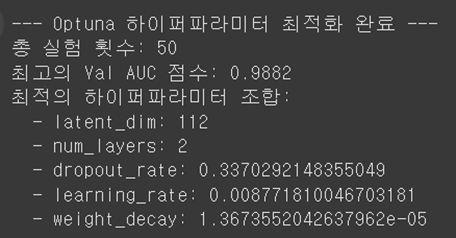
3단계: 학습 및 평가 - AI를 학습시키기
- 모델은 교과서(train_data.edge_index)를 보고 친구 관계의 패턴을 학습하고, 중간고사(val_data)를 보며 학습 방향을 점검
# ---------------------------------------------------
# 3. 모델 학습 루프
# ---------------------------------------------------
loss_history = []
def train():
model.train()
optimizer.zero_grad()
z = model.encode(x, train_data.edge_index)
# loss = model.recon_loss(z, train_data.edge_label_index)
loss = model.recon_loss(z, train_data.edge_index)
loss.backward()
optimizer.step()
return float(loss.detach()) # .detach()를 추가하여 경고 메시지 해결
# ---------------------------------------------------
# 4. 모델 성능 테스트 함수 (오류 수정)
# ---------------------------------------------------
@torch.no_grad()
def test(data_split):
model.eval()
z = model.encode(x, data_split.edge_index)
# 1. '문제지(edge_label_index)'에 대한 모델의 예측값(확률)을 얻음
preds = model.decode(z, data_split.edge_label_index).sigmoid()
# 2. '정답지(edge_label)'를 가져옴
labels = data_split.edge_label
# 3. 예측값과 정답지를 비교하여 성능 점수(AUC, AP) 계산
auc = roc_auc_score(labels.cpu(), preds.cpu())
ap = average_precision_score(labels.cpu(), preds.cpu())
return auc, ap
# ---------------------------------------------------
# 5. 실제 학습 및 평가 실행
# ---------------------------------------------------
for epoch in range(1, epochs + 1):
loss = train()
loss_history.append(loss)
if epoch % 10 == 0:
val_auc, val_ap = test(val_data)
print(f'Epoch: {epoch:03d}, Loss: {loss:.4f}, Val AUC: {val_auc:.4f}, Val AP: {val_ap:.4f}')
test_auc, test_ap = test(test_data)
print("-" * 30)
print(f'최종 성능 => Test AUC: {test_auc:.4f}, Test AP: {test_ap:.4f}') # AUC: 분별력 점수, AP: 정확성 점수 -> 1에 가까울 수록 똑똑한 모델
# ---------------------------------------------------
# 6. Loss 그래프 그리기
# ---------------------------------------------------
plt.figure(figsize=(10, 6))
plt.plot(range(1, epochs + 1), loss_history, label='Training Loss')
plt.title('Training Loss Over Epochs')
plt.xlabel('Epochs')
plt.ylabel('Loss')
plt.legend()
plt.grid(True)
plt.savefig('loss_graph.png')
plt.show()
print("\n'loss_graph.png' 파일이 저장되었습니다.")

- 위 그래프처럼, 학습 초반에 오답률(Loss)이 급격히 감소하다가 잠시 정체기를 거쳐 다시 한번 감소하는 모습을 보임
- 이는 모델이 쉬운 패턴을 먼저 학습한 뒤, 더 복잡하고 미묘한 패턴까지 성공적으로 학습했다는 아주 긍정적인 신호
- 모든 학습이 끝난 뒤, **"기말고사(test_data)"**로 최종 성능을 평가한 결과는 다음과 같음
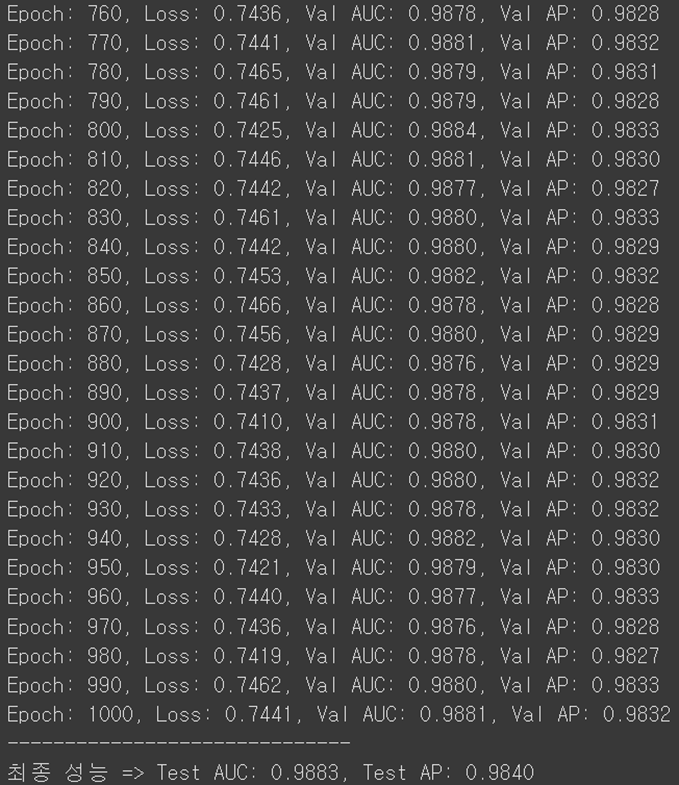
- AUC와 AP는 모델의 성능 점수로, 1에 가까울수록 완벽하다는 뜻
- 약 99%의 정확도로 숨겨진 친구 관계를 예측할 수 있는, 아주 똑똑한 모델이 만들어짐
4단계: 활용 - 친구 추천과 광고 봇 탐지
활용 1: 친구 추천 시스템
- 특정 사용자(예: 728번)에게 새로운 친구를 추천해 보았음
- 모델이 만든 임베딩 벡터를 기준으로, 728번 사용자와 가장 유사한 취향과 사회적 위치를 가진 사용자를 찾아내는 방식
- 결과를 검증하기 위해, 추천된 사용자와 728번 사용자가 **'공동 친구'**를 몇 명이나 가졌는지 확인해 보았음
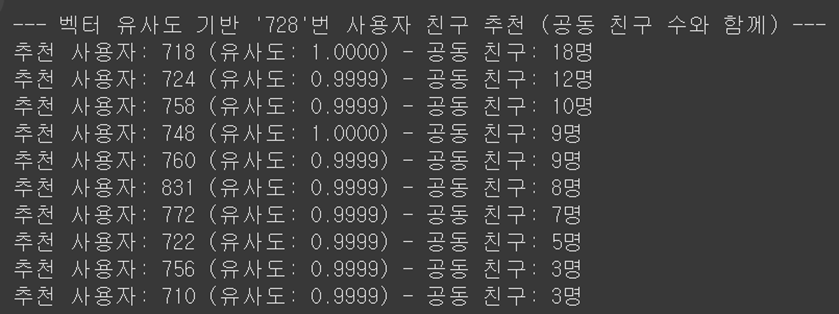
- 결과를 보니, 벡터 유사도가 높게 나온 사용자일수록 실제로도 공동 친구가 많은 경향을 보였음
- 이는 모델이 그래프의 구조를 정확히 이해하여, 같은 커뮤니티에 속한 잠재적 친구를 성공적으로 찾아냈음을 의미
활용 2: 이상치 탐지 (광고/스팸 봇 탐지)
- GAE 모델의 또 다른 강력한 기능은 이상치 탐지
- 모델은 대다수 '정상' 사용자의 패턴을 학습했기 때문에, 이 패턴에서 크게 벗어나는 사용자를 쉽게 찾아낼 수 있음
- '복원 오차(Reconstruction Error)'를 이상 점수로 사용 모델이 특정 사용자의 친구 관계를 제대로 복원하지 못할수록, 그 사용자는 비정상적일 확률이 높음
- 통계적 기준(평균 + 2 * 표준편차)을 적용하여 이상치를 탐지한 결과는 다음과 같음
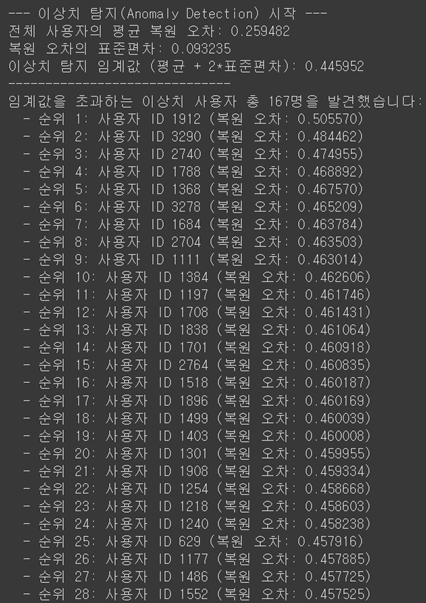

- 탐지된 사용자들은 일반 사용자와 달리, 전체 네트워크와는 고립된 채 무분별한 연결 패턴을 보이는 경향이 있었음
- 이는 이들이 광고나 스팸을 위한 봇 계정일 가능성이 높음을 시사
전체 코드
# .txt → .csv
import pandas as pd
# 파일 경로
txt_file_path = 'facebook_combined.txt'
csv_file_path = 'facebook_combined.csv'
# txt 파일 읽어옴. 공백으로 열이 구분되어 있고, 헤더는 없습니다.
# names=['source', 'target'] 으로 각 열에 이름을 붙여줌.
edge_list = pd.read_csv(txt_file_path, sep=' ', header=None, names=['source', 'target'])
# DataFrame을 CSV 파일로 저장
# index=False 옵션은 맨 앞의 번호(인덱스)를 저장하지 않도록 함.
edge_list.to_csv(csv_file_path, index=False)
print(f"'{csv_file_path}' 파일이 성공적으로 생성!")
#-----------------------------------------------------------------------------------------
!pip install torch
!pip install torch-geometric
!pip install matplotlib
# PyTorch의 Tensor라는 데이터 형식으로 저장되어 있는 것.
# edge_index: 모델이 구조를 학습할 '불완전한 그래프'의 엣지 정보이다. (훈련용)
# edge_label_index: 모델이 "이 둘은 친구일까 아닐까?" 하고 풀어야 할 '문제지'이다. 여기에는 숨겨놓은 진짜 엣지(Positive)와 우리가 찾고 있는 가짜 엣지(Negative)가 모두 들어있다.
# edge_label: 바로 위 edge_label_index에 대한 '정답지'이다. 각 엣지가 진짜면 1, 가짜면 0이라는 값을 가진다.

import pandas as pd
import torch
import torch.nn as nn
import torch.nn.functional as F
from torch_geometric.data import Data
from torch_geometric.transforms import RandomLinkSplit
from torch_geometric.nn import GCNConv, GAE
import matplotlib.pyplot as plt
from sklearn.metrics import roc_auc_score, average_precision_score
import random
import numpy as np

seed = 42
random.seed(seed)
np.random.seed(seed)
torch.manual_seed(seed)

# 1. 원본 엣지 리스트 불러오기
file_path = 'facebook_combined.csv' # (2, 88,234)
edge_list = pd.read_csv(file_path)
edge_index = torch.tensor(edge_list.values).t().contiguous()

# 2. PyG 그래프 데이터 객체 생성
# 전체 엣지 정보를 담은 '원본 그래프'를 만든다.
data = Data(edge_index=edge_index)

# 3. 데이터 분할을 위한 변환(Transform) 정의
# is_undirected=True: 무방향 그래프임을 명시 (A-B 친구면 B-A도 친구)
# add_negative_train_samples=True: 훈련 세트에 1:1 비율로 가짜 엣지 자동 추가
# neg_sampling_ratio=1.0: 검증/테스트 세트에도 1:1 비율로 가짜 엣지 자동 추가
transform = RandomLinkSplit(
    num_val=0.05,  # 검증(Validation) 세트 비율: 5%
    num_test=0.10, # 시험(Test) 세트 비율: 10%
    is_undirected=True,
    add_negative_train_samples=True,
    neg_sampling_ratio=1.0
)

# 4. '원본 그래프'에 transform을 적용하여 데이터 분할 실행
# 이 한 줄로 훈련/검증/시험용 엣지 분리 및 가짜 엣지 생성이 모두 끝.
train_data, val_data, test_data = transform(data)

# --- 결과 확인 ---
print("--- 분할 결과 ---")
print(f"훈련용 데이터셋 (Train Data):\n{train_data}\n")
print(f"검증용 데이터셋 (Validation Data):\n{val_data}\n")
print(f"시험용 데이터셋 (Test Data):\n{test_data}")
print("-" * 20)
print("각 세트의 엣지 정보를 자세히 살펴볼까요?")
print(f"[훈련 세트] 실제 엣지 수: {train_data.edge_label_index.shape[1] // 2}") # 85%
print(f"          가짜 엣지 수: {train_data.edge_label_index.shape[1] - train_data.edge_label.sum().int().item()}")
print(f"          (모델이 학습할 불완전한 그래프의 엣지 수: {train_data.edge_index.shape[1]})")
print("-" * 20)
print(f"[검증 세트] 실제 엣지 수: {val_data.edge_label.sum().int().item()}") # 5%
print(f"          가짜 엣지 수: {val_data.edge_label_index.shape[1] - val_data.edge_label.sum().int().item()}")
print("-" * 20)
print(f"[테스트 세트] 실제 엣지 수: {test_data.edge_label.sum().int().item()}") # 10%
print(f"           가짜 엣지 수: {test_data.edge_label_index.shape[1] - test_data.edge_label.sum().int().item()}\n")

# --- 가짜 엣지 데이터 직접 확인해보기(val_data) ---
val_edges_to_predict = val_data.edge_label_index
val_answers = val_data.edge_label

print("--- 검증용(val) 데이터 내부 확인 ---")
print(f"모델이 풀어야 할 전체 문제 (edge_label_index):\n{val_edges_to_predict}")
print(f"각 문제에 대한 정답 (edge_label):\n{val_answers}")
print("-" * 30)

# 2. '정답지'를 보고 정답이 0인 문제, 즉 '가짜 엣지'만 골라냄.
# val_answers가 0인 위치(인덱스)를 찾음.
negative_edge_indices = (val_answers == 0).nonzero(as_tuple=True)[0]

# 해당 위치에 있는 '가짜 엣지'들만 `edge_label_index`에서 추출.
negative_edges = val_edges_to_predict[:, negative_edge_indices]

print(f"찾았다! '가짜 엣지' 데이터:\n{negative_edges}")
print(f"\n총 {negative_edges.shape[1]}개의 가짜 엣지가 여기에 들어있습니다.")
#-----------------------------------------------------------------------------------------
# # 최적 파라메터 찾기
# # ---------------------------------------------------
# # 0. Optuna 설치
# # ---------------------------------------------------
# !pip install optuna
# import optuna
# import pandas as pd
# import torch
# import torch.nn as nn
# import torch.nn.functional as F
# from torch_geometric.data import Data
# from torch_geometric.transforms import RandomLinkSplit
# from torch_geometric.nn import GCNConv, GAE
# from sklearn.metrics import roc_auc_score
# # ---------------------------------------------------
# # 1. 데이터 준비 (전역 변수로 한 번만 로딩)
# # ---------------------------------------------------
# file_path = 'facebook_combined.txt'
# edge_list = pd.read_csv(file_path, sep=' ', header=None, names=['source', 'target'])
# edge_index = torch.tensor(edge_list.values).t().contiguous()
# num_nodes = edge_index.max().item() + 1
# data = Data(edge_index=edge_index, num_nodes=num_nodes)
# transform = RandomLinkSplit(
# num_val=0.05, num_test=0.10, is_undirected=True,
# add_negative_train_samples=True, neg_sampling_ratio=1.0
# )
# train_data, val_data, test_data = transform(data)
# x = F.one_hot(torch.arange(num_nodes)).float()
# in_channels = x.size(1)
# # ---------------------------------------------------
# # 2. "objective" 함수 정의: 모델 학습 및 평가 전체 과정
# # ---------------------------------------------------
# def objective(trial):
# # --- A. 하이퍼파라미터 탐색 범위 설정 ---
# latent_dim = trial.suggest_int('latent_dim', 32, 128, step=16) # 32, 48, 64...
# num_layers = trial.suggest_int('num_layers', 2, 4)
# dropout_rate = trial.suggest_uniform('dropout_rate', 0.2, 0.6)
# learning_rate = trial.suggest_loguniform('learning_rate', 1e-3, 1e-2) # 0.001 ~ 0.01
# weight_decay = trial.suggest_loguniform('weight_decay', 1e-5, 1e-3)
# # --- B. 모델 정의 및 학습 (기존 코드와 거의 동일) ---
# class GCNEncoder(nn.Module):
# def __init__(self, in_channels, hidden_channels, out_channels, num_layers, dropout):
# super().__init__()
# self.convs = nn.ModuleList()
# self.convs.append(GCNConv(in_channels, hidden_channels))
# for _ in range(num_layers - 2):
# self.convs.append(GCNConv(hidden_channels, hidden_channels))
# self.convs.append(GCNConv(hidden_channels, out_channels))
# self.dropout = dropout
# def forward(self, x, edge_index):
# for i, conv in enumerate(self.convs):
# x = conv(x, edge_index)
# if i != len(self.convs) - 1:
# x = x.relu()
# x = F.dropout(x, p=self.dropout, training=self.training)
# return x
# encoder = GCNEncoder(in_channels, 2 * latent_dim, latent_dim, num_layers, dropout_rate)
# model = GAE(encoder)
# optimizer = torch.optim.Adam(model.parameters(), lr=learning_rate, weight_decay=weight_decay)
# # 학습 루프
# epochs = 200 # 최적화 중에는 에포크를 줄여서 빠르게 테스트
# for epoch in range(1, epochs + 1):
# model.train()
# optimizer.zero_grad()
# z = model.encode(x, train_data.edge_index)
# loss = model.recon_loss(z, train_data.edge_index)
# loss.backward()
# optimizer.step()
# # --- C. 성능 평가 및 목표 점수 반환 ---
# model.eval()
# with torch.no_grad():
# z = model.encode(x, val_data.edge_index)
# preds = model.decode(z, val_data.edge_label_index).sigmoid()
# labels = val_data.edge_label
# val_auc = roc_auc_score(labels.cpu(), preds.cpu())
# # Optuna는 이 점수를 최대화하는 방향으로 다음 하이퍼파라미터를 탐색
# return val_auc
# # ---------------------------------------------------
# # 3. Study 생성 및 최적화 실행
# # ---------------------------------------------------
# # "maximize" a Val AUC score
# study = optuna.create_study(direction='maximize')
# # 50번의 다른 하이퍼파라미터 조합으로 실험
# study.optimize(objective, n_trials=50) # 50번의 trial 실행
# # ---------------------------------------------------
# # 4. 결과 확인
# # ---------------------------------------------------
# print("\n--- Optuna 하이퍼파라미터 최적화 완료 ---")
# print(f"총 실험 횟수: {len(study.trials)}")
# print(f"최고의 Val AUC 점수: {study.best_value:.4f}")
# print("최적의 하이퍼파라미터 조합:")
# for key, value in study.best_params.items():
# print(f" - {key}: {value}")
#-----------------------------------------------------------------------------------------
import pandas as pd
import torch
import torch.nn as nn
import torch.nn.functional as F
from torch_geometric.data import Data
from torch_geometric.transforms import RandomLinkSplit
from torch_geometric.nn import GCNConv, GAE
import matplotlib.pyplot as plt
from sklearn.metrics import roc_auc_score, average_precision_score
# ---------------------------------------------------
# 1. 데이터 준비
# ---------------------------------------------------
file_path = 'facebook_combined.txt'
edge_list = pd.read_csv(file_path, sep=' ', header=None, names=['source', 'target'])
edge_index = torch.tensor(edge_list.values).t().contiguous()
# num_nodes를 명시적으로 지정하여 UserWarning 해결
num_nodes = edge_index.max().item() + 1
data = Data(edge_index=edge_index, num_nodes=num_nodes)
# 모든 데이터셋이 'edge_label'과 'edge_label_index'를 갖도록 설정
transform = RandomLinkSplit(
num_val=0.05,
num_test=0.10,
is_undirected=True,
add_negative_train_samples=True,
neg_sampling_ratio=1.0
)
train_data, val_data, test_data = transform(data)
# ---------------------------------------------------
# 2. GAE 모델 정의
# ---------------------------------------------------
class GCNEncoder(nn.Module):
# __init__ 함수가 모든 하이퍼파라미터를 입력받도록 수정
def __init__(self, in_channels, hidden_channels, out_channels, num_layers,
dropout):
super().__init__()
self.convs = nn.ModuleList()
# 첫 번째 레이어 (입력 -> 은닉)
self.convs.append(GCNConv(in_channels, hidden_channels))
# 중간 레이어들 (은닉 -> 은닉)
# num_layers가 3 이상일 때, 그 수만큼 중간 레이어가 추가됩니다.
for _ in range(num_layers - 2):
self.convs.append(GCNConv(hidden_channels, hidden_channels))
# 마지막 레이어 (은닉 -> 출력)
self.convs.append(GCNConv(hidden_channels, out_channels))
self.dropout = dropout
def forward(self, x, edge_index):
# 모든 레이어를 순서대로 통과
for i, conv in enumerate(self.convs):
x = conv(x, edge_index)
# 마지막 출력 레이어가 아니면 활성화 함수(ReLU)와 드롭아웃을 적용
if i != len(self.convs) - 1:
x = x.relu()
x = F.dropout(x, p=self.dropout, training=self.training)
return x
# 모델 파라미터 설정
# latent_dim = 64 # lihtGCN의 latent_dim 과 동일
# num_layers = 2 # GCN 레이어 수
# dropout_rate = 0.5 # 드롭아웃 비율(과적합 방지)
# epochs = 300 # 학습 횟수
# learning_rate = 0.01 # 학습률
# weight_decay = 5e-4 # 가중치 감소 (L2 규제) -> 5e-4 = 0.0005
latent_dim = 112
num_layers = 2
dropout_rate = 0.3370292148355049
epochs = 500
learning_rate = 0.008771810046703181
weight_decay = 1.3673552042637962e-05
# 노드 특성을 One-Hot 인코딩으로 명확하게 초기화
x = F.one_hot(torch.arange(num_nodes)).float()
in_channels = x.size(1)
encoder = GCNEncoder(in_channels, 2 * latent_dim, latent_dim, num_layers, dropout_rate)
model = GAE(encoder)
optimizer = torch.optim.Adam(model.parameters(), lr=learning_rate, weight_decay=weight_decay)
# ---------------------------------------------------
# 3. 모델 학습 루프
# ---------------------------------------------------
loss_history = []
def train():
    model.train()
    optimizer.zero_grad()
    z = model.encode(x, train_data.edge_index)
    # loss = model.recon_loss(z, train_data.edge_label_index)
    loss = model.recon_loss(z, train_data.edge_index)
    loss.backward()
    optimizer.step()
    return float(loss.detach()) # .detach()를 추가하여 경고 메시지 해결

# ---------------------------------------------------
# 4. 모델 성능 테스트 함수 (오류 수정)
# ---------------------------------------------------
@torch.no_grad()
def test(data_split):
    model.eval()
    z = model.encode(x, data_split.edge_index)

    # 1. '문제지(edge_label_index)'에 대한 모델의 예측값(확률)을 얻음
    preds = model.decode(z, data_split.edge_label_index).sigmoid()
    # 2. '정답지(edge_label)'를 가져옴
    labels = data_split.edge_label

    # 3. 예측값과 정답지를 비교하여 성능 점수(AUC, AP) 계산
    auc = roc_auc_score(labels.cpu(), preds.cpu())
    ap = average_precision_score(labels.cpu(), preds.cpu())

    return auc, ap

# ---------------------------------------------------
# 5. 실제 학습 및 평가 실행
# ---------------------------------------------------
for epoch in range(1, epochs + 1):
    loss = train()
    loss_history.append(loss)
    if epoch % 10 == 0:
        val_auc, val_ap = test(val_data)
        print(f'Epoch: {epoch:03d}, Loss: {loss:.4f}, Val AUC: {val_auc:.4f}, Val AP: {val_ap:.4f}')

test_auc, test_ap = test(test_data)
print("-" * 30)
print(f'최종 성능 => Test AUC: {test_auc:.4f}, Test AP: {test_ap:.4f}') # AUC: 분별력 점수, AP: 정확성 점수 -> 1에 가까울 수록 똑똑한 모델


# ---------------------------------------------------
# 6. Loss 그래프 그리기
# ---------------------------------------------------
plt.figure(figsize=(10, 6))
plt.plot(range(1, epochs + 1), loss_history, label='Training Loss')
plt.title('Training Loss Over Epochs')
plt.xlabel('Epochs')
plt.ylabel('Loss')
plt.legend()
plt.grid(True)
plt.savefig('loss_graph.png')
plt.show()
print("\n'loss_graph.png' 파일이 저장되었습니다.")
#-----------------------------------------------------------------------------------------
from sklearn.metrics.pairwise import cosine_similarity
import numpy as np
# ---------------------------------------------------
# 7-1. 벡터 유사도로 친구 추천하기 ('공동 친구' 수 검증 추가)
# ---------------------------------------------------
# 1. 모델 평가 모드 및 최종 벡터값(임베딩) 얻기
model.eval()
with torch.no_grad():
z = model.encode(x, data.edge_index)
z_numpy = z.cpu().numpy()
# 2. 추천을 받을 사용자 ID 지정 및 유사도 계산
target_user_id = 728
target_user_vector = z_numpy[target_user_id].reshape(1, -1)
similarity_scores = cosine_similarity(target_user_vector, z_numpy).flatten()
sorted_user_indices = np.argsort(similarity_scores)[::-1]
# 3.검증을 위해 'target_user'의 친구 목록을 미리 만들어 둠
target_user_friends = set(
edge_list[edge_list['source'] == target_user_id]['target'].tolist() +
edge_list[edge_list['target'] == target_user_id]['source'].tolist()
)
# --- 결과 출력 ---
print(f"\n--- 벡터 유사도 기반 '{target_user_id}'번 사용자 친구 추천 (공동 친구 수와 함께) ---")
recommendations = []
num_recommendations = 10
for user_idx in sorted_user_indices:
if len(recommendations) >= num_recommendations:
break
# 자기 자신이 아니고, 이미 친구가 아닌 경우에만 추천
if user_idx != target_user_id and user_idx not in target_user_friends:
# 4. 추천된 사용자의 친구 목록을 찾아서 '공동 친구' 수를 계산
reco_user_friends = set(
edge_list[edge_list['source'] == user_idx]['target'].tolist() +
edge_list[edge_list['target'] == user_idx]['source'].tolist()
)
mutual_friends_count = len(target_user_friends.intersection(reco_user_friends))
recommendations.append((user_idx, similarity_scores[user_idx], mutual_friends_count))
# 추천 목록 출력 (공동 친구 많은 순으로 재정렬해서 보면 더 명확함)
recommendations.sort(key=lambda item: item[2], reverse=True)
for user, score, mutual_count in recommendations:
print(f"추천 사용자: {user} (유사도: {score:.4f}) - 공동 친구: {mutual_count}명")
#-----------------------------------------------------------------------------------------
# ---------------------------------------------------
# 7-2. 이상치 탐지 (Anomaly Detection)
# ---------------------------------------------------
from torch_geometric.utils import to_dense_adj
print("\n--- 이상치 탐지(Anomaly Detection) 시작 ---")
# 1. 학습된 모델을 평가 모드로 설정
model.eval()
# 2. 전체 그래프에 대한 최종 벡터값(임베딩)과 복원된 그래프 얻기
with torch.no_grad():
# 최종 벡터값 z 계산
z = model.encode(x, data.edge_index)
# z를 이용해 전체 그래프의 연결 확률을 계산 (디코딩)
A_hat = torch.sigmoid(torch.matmul(z, z.T))
# 3. 원본 그래프(Adjacency Matrix) 생성
# to_dense_adj 함수는 엣지 리스트를 행렬 형태로 변환해줍니다.
A_true = to_dense_adj(data.edge_index, max_num_nodes=num_nodes)[0]
# 4. 각 사용자(노드)별로 '복원 오차' 계산
# - 원본(A_true)과 복원본(A_hat)의 차이를 제곱하여 평균을 냅니다.
# - 이 값이 클수록 모델이 해당 노드의 관계를 잘 복원하지 못했다는 의미입니다.
recon_errors = torch.mean((A_true - A_hat)**2, dim=1)
# --- 상위 10명 이상치 탐지 ---
# 5. 복원 오차가 가장 큰 순서대로 사용자 정렬
num_anomalies = 10 # 상위 10명의 이상치를 찾습니다.
sorted_errors, anomalous_nodes = torch.sort(recon_errors, descending=True)
# --- 표준편차 기반 이상치 탐지 ---
# 5. 복원 오차의 평균과 표준편차 계산
mean_error = recon_errors.mean()
std_error = recon_errors.std()
k = 2 # 표준편차 계수 (k=2는 상위 약 2.5%를 의미)
# 6. 이상치 탐지를 위한 임계값(Threshold) 설정
# - "평균에서 표준편차의 k배만큼 떨어진 값"을 기준으로 삼습니다.
threshold = mean_error + k * std_error
# 7. 임계값을 초과하는 모든 사용자들을 '이상치'로 탐지
# - recon_errors가 threshold보다 큰 노드의 인덱스를 모두 찾아냅니다.
anomalous_nodes_indices = (recon_errors > threshold).nonzero(as_tuple=True)[0]
# --- 결과 출력 ---
print(f"전체 사용자의 평균 복원 오차: {mean_error:.6f}")
print(f"복원 오차의 표준편차: {std_error:.6f}")
print(f"이상치 탐지 임계값 (평균 + {k}*표준편차): {threshold:.6f}")
print("-" * 30)
if len(anomalous_nodes_indices) > 0:
print(f"임계값을 초과하는 이상치 사용자 총 {len(anomalous_nodes_indices)}명을 발견했습니다:")
# 이상치 점수가 높은 순으로 정렬해서 보여주기
anomalous_scores = recon_errors[anomalous_nodes_indices]
sorted_indices = torch.argsort(anomalous_scores, descending=True)
for i, idx in enumerate(sorted_indices):
node_id = anomalous_nodes_indices[idx].item()
error = anomalous_scores[idx].item()
print(f" - 순위 {i+1}: 사용자 ID {node_id} (복원 오차: {error:.6f})")
else:
print("임계값을 초과하는 이상치 사용자를 발견하지 못했습니다.")
print("-" * 30)
print(f"가장 높은 복원 오차(Anomaly Score)를 가진 상위 {num_anomalies}명의 사용자:")
for i in range(num_anomalies):
node_id = anomalous_nodes[i].item()
error = sorted_errors[i].item()
print(f" - 순위 {i+1}: 사용자 ID {node_id} (복원 오차: {error:.6f})")'AI(GNN)' 카테고리의 다른 글
| [그래프 신경망 빅데이터] Cora 데이터셋을 이용한 GCN, GAT, FNN성능 비교 (0) | 2025.09.25 |
|---|