
- 분류 전체보기 (337)

- SQL (2)
- JAVA (6)
- REACT (3)
- OS (24)
- AI(ML & DL) (37)
- BLOCKCHAIN (15)
- ARCHITECTURE (7)
- BACKJOON (7)
- DOCKER (10)
- 취업 (1)
- GCP (8)
- TYPESCRIPT (10)
- MOBILE PROGRAMING (20)
- DATABASE DESIGN (18)
- AI(GNN) (2)
- ALGORITHM (14)
- CLAUD COMPUTERING (13)
- PYTHON (3)
- SPRING BOOT (13)
- INFLEARN (63)
- AI(MCP) (2)
- NETWORK (22)
- CODINGTEST (3)
- 기타 (5)
- STUDYING (28)
| 일 | 월 | 화 | 수 | 목 | 금 | 토 |
|---|---|---|---|---|---|---|
| 1 | ||||||
| 2 | 3 | 4 | 5 | 6 | 7 | 8 |
| 9 | 10 | 11 | 12 | 13 | 14 | 15 |
| 16 | 17 | 18 | 19 | 20 | 21 | 22 |
| 23 | 24 | 25 | 26 | 27 | 28 | 29 |
| 30 | 31 |
- architecture
- inflearn
- CS
- cloud
- SQL
- blockchain
- spring boot
- GCP
- 배포
- TypeScript
- Kotlin
- docker
- DB
- OS
- Studying
- AI
- java
- Database
- VUE
- springboot
- frontend
- Python
- Spring
- http
- react
- Algorithm
- Network
- Design
- DL
- Android
- Today
- Total
소소한 지식 저장소
[스프링 DB 2편 - 데이터 접근 활용 기술] 7. 데이터 접근 기술 - Querydsl 본문
1. Querydsl 소개
Querydsl은 JPA의 동적 쿼리 문제를 자바 코드로 해결하는 라이브러리다. JPQL 문자열을 조립하는 대신, 컴파일 시점에 생성되는 Q 타입과 타입 안전한 API로 조건을 작성한다.
- 동적 쿼리: BooleanBuilder 또는 조건 메서드를 where()에 조합한다.
- 컴파일 시점 검증: 엔티티 속성명 오타·타입 불일치를 컴파일 단계에서 확인한다.
- 조건 재사용: likeItemName(), maxPrice()처럼 조건을 메서드로 분리해 여러 쿼리에서 재사용한다.
Querydsl은 JPA 위에서 JPQL을 생성하므로 EntityManager가 필요하다. JPA와 스프링 데이터 JPA를 이해한 뒤 사용하는 것이 바람직하다.
2. Querydsl 설정
스프링 부트 2.x와 3.x는 Querydsl 의존성의 jpa·jakarta 분류가 다르다. Q 타입은 어노테이션 프로세서가 컴파일 시점에 자동 생성하므로 Git에 포함하지 않는다.
스프링 부트 2.x - build.gradle
plugins {
id 'org.springframework.boot' version '2.6.5'
id 'io.spring.dependency-management' version '1.0.11.RELEASE'
id 'java'
}

group = 'com.example'
version = '0.0.1-SNAPSHOT'
sourceCompatibility = '11'

ext["hibernate.version"] = "5.6.5.Final"

configurations {
compileOnly {
extendsFrom annotationProcessor
}
}

repositories {
mavenCentral()
}

dependencies {
implementation 'org.springframework.boot:spring-boot-starter-thymeleaf'
implementation 'org.springframework.boot:spring-boot-starter-web'
//JdbcTemplate 추가
//implementation 'org.springframework.boot:spring-boot-starter-jdbc'
//MyBatis 추가
implementation 'org.mybatis.spring.boot:mybatis-spring-boot-starter:2.2.0'
//JPA, 스프링 데이터 JPA 추가
implementation 'org.springframework.boot:spring-boot-starter-data-jpa'
//Querydsl 추가
implementation 'com.querydsl:querydsl-jpa'
annotationProcessor "com.querydsl:querydsl-apt:${dependencyManagement.importedProperties['querydsl.version']}:jpa"
annotationProcessor "jakarta.annotation:jakarta.annotation-api"
annotationProcessor "jakarta.persistence:jakarta.persistence-api"
//H2 데이터베이스 추가
runtimeOnly 'com.h2database:h2'
compileOnly 'org.projectlombok:lombok'
annotationProcessor 'org.projectlombok:lombok'
testImplementation 'org.springframework.boot:spring-boot-starter-test'
//테스트에서 lombok 사용
testCompileOnly 'org.projectlombok:lombok'
testAnnotationProcessor 'org.projectlombok:lombok'
}

tasks.named('test') {
useJUnitPlatform()
}

//Querydsl 추가, 자동 생성된 Q클래스 gradle clean으로 제거
clean {
delete file('src/main/generated')
}
querydsl-apt 의존성 문자열은 PDF 지면에서 줄바꿈되어 보여도 실제 Gradle 파일에서는 한 줄이다. clean 작업은 IntelliJ 빌드 옵션에서 생성되는 src/main/generated의 Q 타입도 함께 지운다.
스프링 부트 3.x - 의존성 차이
dependencies {
//Querydsl 추가
    implementation 'com.querydsl:querydsl-jpa:5.0.0:jakarta'

    annotationProcessor "com.querydsl:querydsl-apt:${dependencyManagement.importedProperties['querydsl.version']}:jakarta"
    annotationProcessor "jakarta.annotation:jakarta.annotation-api"
    annotationProcessor "jakarta.persistence:jakarta.persistence-api"
}
2.x의 :jpa가 3.x에서는 :jakarta로 바뀐다. 프로젝트의 Spring Boot·Hibernate·JPA API 세대와 맞는 의존성을 선택해야 한다.
3. Q 타입 생성 확인
compileJava 또는 애플리케이션/테스트 실행 후 hello.itemservice.domain.QItem이 생성되어야 한다.
Gradle 빌드 옵션
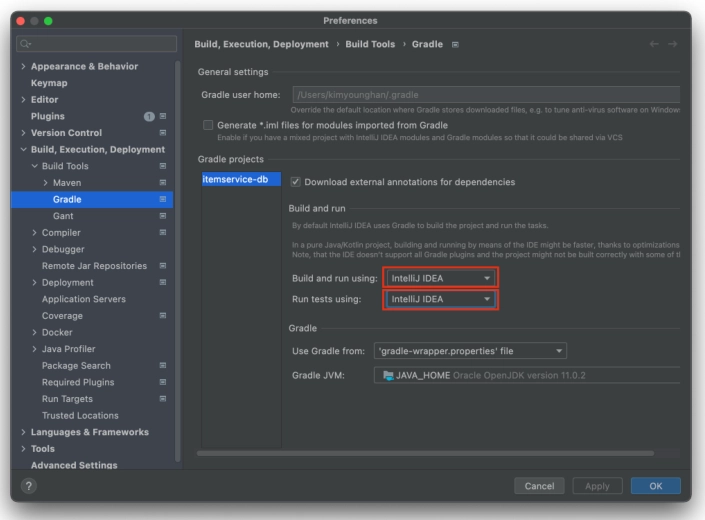
IntelliJ의 Gradle 설정에서 Build and run, Run tests using을 같은 방식으로 맞춘다. Gradle 옵션이면 Q 타입은 build/generated/sources/annotationProcessor/java/main 아래에 생성된다.
- IntelliJ 메뉴: Gradle → Tasks → build → clean, Gradle → Tasks → other → compileJava
- 콘솔: ./gradlew clean compileJava
- Q 타입 위치: build/generated/sources/annotationProcessor/java/main/hello.itemservice.domain.QItem
IntelliJ IDEA 빌드 옵션
Build → Build Project, Build → Rebuild, main() 또는 테스트 실행 후 src/main/generated/hello.itemservice.domain.QItem을 확인한다. 이 경로의 자동 생성 파일도 Git에 포함하지 않는다.
4. Querydsl 적용 - JpaItemRepositoryV3
JPAQueryFactory는 JPQL을 만들기 때문에 EntityManager로 생성한다. 저장·수정·단건 조회는 JPA 기본 기능을 그대로 사용하고, 목록 조회의 동적 조건을 Querydsl로 처리한다.
JpaItemRepositoryV3
package hello.itemservice.repository.jpa;

import com.querydsl.core.BooleanBuilder;
import com.querydsl.core.types.dsl.BooleanExpression;
import com.querydsl.jpa.impl.JPAQueryFactory;
import hello.itemservice.domain.Item;
import hello.itemservice.domain.QItem;
import hello.itemservice.repository.ItemRepository;
import hello.itemservice.repository.ItemSearchCond;
import hello.itemservice.repository.ItemUpdateDto;
import org.springframework.stereotype.Repository;
import org.springframework.transaction.annotation.Transactional;
import org.springframework.util.StringUtils;

import javax.persistence.EntityManager;
import java.util.List;
import java.util.Optional;

import static hello.itemservice.domain.QItem.*;

@Repository
@Transactional
public class JpaItemRepositoryV3 implements ItemRepository {

    private final EntityManager em;
    private final JPAQueryFactory query;

    public JpaItemRepositoryV3(EntityManager em) {
        this.em = em;
        this.query = new JPAQueryFactory(em);
    }

    @Override
    public Item save(Item item) {
        em.persist(item);
        return item;
    }

    @Override
    public void update(Long itemId, ItemUpdateDto updateParam) {
        Item findItem = findById(itemId).orElseThrow();

        findItem.setItemName(updateParam.getItemName());
        findItem.setPrice(updateParam.getPrice());
        findItem.setQuantity(updateParam.getQuantity());
    }

    @Override
    public Optional<Item> findById(Long id) {
        Item item = em.find(Item.class, id);
        return Optional.ofNullable(item);
    }

    public List<Item> findAllOld(ItemSearchCond itemSearch) {
        String itemName = itemSearch.getItemName();
        Integer maxPrice = itemSearch.getMaxPrice();

        QItem item = QItem.item;
        BooleanBuilder builder = new BooleanBuilder();

        if (StringUtils.hasText(itemName)) {
            builder.and(item.itemName.like("%" + itemName + "%"));
        }

        if (maxPrice != null) {
            builder.and(item.price.loe(maxPrice));
        }

        List<Item> result = query
                .select(item)
                .from(item)
                .where(builder)
                .fetch();

        return result;
    }

    @Override
    public List<Item> findAll(ItemSearchCond cond) {
        String itemName = cond.getItemName();
        Integer maxPrice = cond.getMaxPrice();

        List<Item> result = query
                .select(item)
                .from(item)
                .where(likeItemName(itemName), maxPrice(maxPrice))
                .fetch();

        return result;
    }

    private BooleanExpression likeItemName(String itemName) {

        if (StringUtils.hasText(itemName)) {
            return item.itemName.like("%" + itemName + "%");
        }

        return null;
    }

    private BooleanExpression maxPrice(Integer maxPrice) {

        if (maxPrice != null) {
            return item.price.loe(maxPrice);
        }

        return null;
    }
}
BooleanBuilder 방식
findAllOld()는 조건마다 BooleanBuilder에 and()를 더한다. itemName이 있으면 like, maxPrice가 있으면 loe 조건을 추가하며, 모두 없으면 빈 조건으로 전체 목록을 조회한다.
조건 메서드 조합 방식
findAll()은 where(likeItemName(itemName), maxPrice(maxPrice))로 조건을 전달한다. Querydsl의 where()는 null 조건을 무시하고 여러 조건을 AND로 결합한다. 따라서 조건 메서드는 필요한 경우에만 BooleanExpression을 반환하고, 아닐 때 null을 반환한다.
이 방식은 조건을 메서드로 추출해 다른 쿼리에도 재사용할 수 있고, 문자열 JPQL 조립보다 읽기 쉽다.
5. 설정 교체
QuerydslConfig
package hello.itemservice.config;

import hello.itemservice.repository.ItemRepository;
import hello.itemservice.repository.jpa.JpaItemRepositoryV3;
import hello.itemservice.service.ItemService;
import hello.itemservice.service.ItemServiceV1;
import lombok.RequiredArgsConstructor;
import org.springframework.context.annotation.Bean;
import org.springframework.context.annotation.Configuration;

import javax.persistence.EntityManager;

@Configuration
@RequiredArgsConstructor
public class QuerydslConfig {

    private final EntityManager em;

    @Bean
    public ItemService itemService() {
        return new ItemServiceV1(itemRepository());
    }

    @Bean
    public ItemRepository itemRepository() {
        return new JpaItemRepositoryV3(em);
    }
}
ItemService는 계속 ItemRepository에 의존한다. 설정에서 JpaItemRepositoryV3를 주입하므로 서비스·컨트롤러를 바꾸지 않고 Querydsl 구현으로 교체할 수 있다.
Querydsl은 별도 스프링 예외 추상화를 제공하지 않는다. JPA와 같이 @Repository의 예외 변환 AOP가 DataAccessException 계층으로 변환한다.
6. 최종 요약 정리
| 주제 | 핵심 내용 |
| Q 타입 | 어노테이션 프로세서가 컴파일 시점에 생성하는 타입 안전한 엔티티 메타 모델이며 Git에 포함하지 않는다. |
| JPAQueryFactory | EntityManager 기반으로 Querydsl JPQL을 생성·실행한다. |
| BooleanBuilder | 조건에 따라 and()를 누적하여 동적 WHERE 절을 만든다. |
| BooleanExpression | 조건을 메서드로 모듈화하고 where()에 조합해 재사용한다. |
| where() | 여러 조건을 AND로 결합하며 null 조건은 무시한다. |
| 장점 | 문자열 JPQL 조립을 줄이고 컴파일 시점 오류 검증·조건 재사용을 제공한다. |
'INFLEARN' 카테고리의 다른 글
| [스프링 DB 2편 - 데이터 접근 활용 기술] 8. 데이터 접근 기술 - 활용 방안 (0) | 2026.07.26 |
|---|---|
| [스프링 DB 2편 - 데이터 접근 활용 기술] 6. 데이터 접근 기술 - 스프링 데이터 JPA (0) | 2026.07.19 |
| [스프링 DB 2편 - 데이터 접근 활용 기술] 5. 데이터 접근 기술 - JPA (0) | 2026.07.19 |
| [스프링 DB 2편 - 데이터 접근 활용 기술] 3. 데이터 접근 기술 - 테스트 (0) | 2026.07.17 |
| [스프링 DB 2편 - 데이터 접근 활용 기술] 2. 데이터 접근 기술 - 스프링 JdbcTemplate (0) | 2026.07.13 |


