1. 프로젝트 생성
스프링 부트 스타터 사이트(https://start.spring.io)를 통해 프로젝트를 생성한다.
- Project: Gradle Project
- Language: Java
- Spring Boot: 2.4.x
- Project Metadata
- Group: hello
- Artifact: item-service
- Packaging: Jar (주의: JSP를 사용하지 않으므로 Jar를 권장)
- Java: 11
- Dependencies: Spring Web, Thymeleaf, Lombok
build.gradle 설정
plugins {
    id 'org.springframework.boot' version '2.4.3'
    id 'io.spring.dependency-management' version '1.0.11.RELEASE'
    id 'java'
}

group = 'hello'
version = '0.0.1-SNAPSHOT'
sourceCompatibility = '11'

configurations {
    compileOnly {
        extendsFrom annotationProcessor
    }
}

repositories {
    mavenCentral()
}

dependencies {
    implementation 'org.springframework.boot:spring-boot-starter-thymeleaf'
    implementation 'org.springframework.boot:spring-boot-starter-web'
    compileOnly 'org.projectlombok:lombok'
    annotationProcessor 'org.projectlombok:lombok'
    testImplementation 'org.springframework.boot:spring-boot-starter-test'
}

test {
    useJUnitPlatform()
}
Welcome 페이지 추가 (/resources/static/index.html)
<!DOCTYPE html>
<html>
<head>
    <meta charset="UTF-8">
    <title>Title</title>
</head>
<body>
<ul>
    <li>상품 관리
        <ul>
            <li><a href="/basic/items">상품 관리 기본</a></li>
        </ul>
    </li>
</ul>
</body>
</html>
2. 요구사항 분석
상품을 관리할 수 있는 서비스를 개발한다.
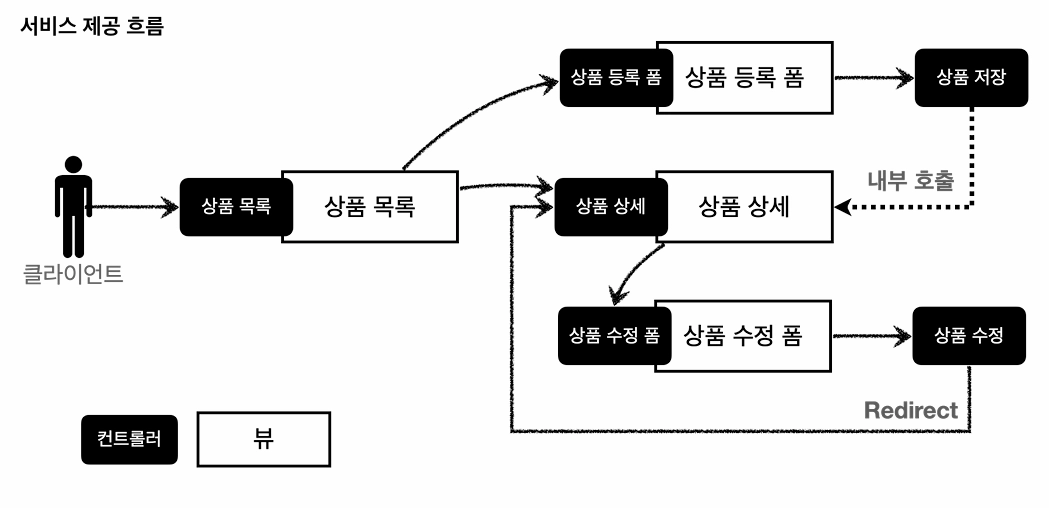
상품 도메인 모델
- 상품 ID
- 상품명
- 가격
- 수량
상품 관리 기능
- 상품 목록 조회
- 상품 상세 조회
- 상품 등록
- 상품 수정
3. 상품 도메인 개발
Item - 상품 객체
package com.example.springitemservice.domain.item;

import lombok.Getter;
import lombok.Setter;

@Getter
@Setter
public class Item {

    private Long id;
    private String itemName;
    private Integer price; // price가 null인 경우도 있다고 고려해서 int가 아닌 Integer
    private Integer quantity;

    public Item() {

    }

    public Item(String itemName, Integer price, Integer quantity) {
        this.itemName = itemName;
        this.price = price;
        this.quantity = quantity;
    }
}
- @Data: Lombok의 기능을 사용하여 Getter, Setter, ToString 등을 자동으로 생성한다. (핵심 도메인 모델에서는 예측하지 못한 동작을 막기 위해 주의해서 사용해야 하지만, 여기서는 예제이므로 편의상 사용)
ItemRepository - 상품 저장소
package com.example.springitemservice.domain.item;

import org.springframework.stereotype.Repository;

import java.util.ArrayList;
import java.util.HashMap;
import java.util.List;
import java.util.Map;

@Repository
public class ItemRepository {

    private static final Map<Long, Item> store = new HashMap<>(); // static 사용
    private static long sequence = 0L;

    public Item save(Item item) {
        item.setId(++sequence);
        store.put(item.getId(), item);

        return item;
    }

    public Item findById(Long id) {
        return store.get(id);
    }

    public List<Item> findAll() {
        return new ArrayList<>(store.values());
    }

    public void update(Long itemId, Item updateParam) {
        Item findItem = store.get(itemId);

        findItem.setItemName(updateParam.getItemName());
        findItem.setPrice(updateParam.getPrice());
        findItem.setQuantity(updateParam.getQuantity());
    }

    public void clearStore() {
        store.clear();
    }
}
ItemRepository Test - 상품 저장소 테스트
package com.example.springitemservice.domain.item;

import org.junit.jupiter.api.AfterEach;
import org.junit.jupiter.api.Test;

import java.util.List;

import static org.assertj.core.api.Assertions.assertThat;

class ItemRepositoryTest {

    ItemRepository itemRepository = new ItemRepository();

    @AfterEach
    void afterEach() {
        itemRepository.clearStore();
    }

    @Test
    void save() {
        //given
        Item item = new Item("itemA", 10000, 10);

        //when
        Item savedItem = itemRepository.save(item);

        //then
        Item findItem = itemRepository.findById(item.getId());
        assertThat(findItem).isEqualTo(savedItem);
    }

    @Test
    void findAll() {
        //given
        Item item1 = new Item("item1", 10000, 10);
        Item item2 = new Item("item2", 20000, 20);
        itemRepository.save(item1);
        itemRepository.save(item2);

        //when
        List<Item> result = itemRepository.findAll();

        //then
        assertThat(result.size()).isEqualTo(2);
        assertThat(result).contains(item1, item2);
    }

    @Test
    void updateItem() {
        //given
        Item item = new Item("item1", 10000, 10);
        Item savedItem = itemRepository.save(item);
        Long itemId = savedItem.getId();

        //when
        Item updateParam = new Item("item2", 20000, 30);
        itemRepository.update(itemId, updateParam);
        Item findItem = itemRepository.findById(itemId);

        //then
        assertThat(findItem.getItemName()).isEqualTo(updateParam.getItemName());
        assertThat(findItem.getPrice()).isEqualTo(updateParam.getPrice());
        assertThat(findItem.getQuantity()).isEqualTo(updateParam.getQuantity());
    }

}
4. 정적 상품 서비스 HTML (Static)
백엔드 로직 완성 전, 웹 퍼블리셔가 부트스트랩을 활용해 제공한 HTML 파일들이다. 이 파일들은 /resources/static 폴더에 위치하여 스프링 부트가 정적 리소스로 제공한다.
/resources/static/html/items.html
<!DOCTYPE HTML>
<html>
<head>
    <meta charset="utf-8">
    <link href="../css/bootstrap.min.css" rel="stylesheet">
</head>
<body>
<div class="container" style="max-width: 600px">
    <div class="py-5 text-center">
        <h2>상품 목록</h2>
    </div>
    <div class="row">
        <div class="col">
            <button class="btn btn-primary float-end"
                    onclick="location.href='addForm.html'" type="button">상품 등록
            </button>
        </div>
    </div>
    <hr class="my-4">
    <div>
        <table class="table">
            <thead>
            <tr>
                <th>ID</th>
                <th>상품명</th>
                <th>가격</th>
                <th>수량</th>
            </tr>
            </thead>
            <tbody>
            <tr>
                <td><a href="item.html">1</a></td>
                <td><a href="item.html">테스트 상품1</a></td>
                <td>10000</td>
                <td>10</td>
            </tr>
            <tr>
                <td><a href="item.html">2</a></td>
                <td><a href="item.html">테스트 상품2</a></td>
                <td>20000</td>
                <td>20</td>
            </tr>
            </tbody>
        </table>
    </div>
</div>
</body>
</html>
/resources/static/html/item.html
<!DOCTYPE HTML>
<html>
<head>
    <meta charset="utf-8">
    <link href="../css/bootstrap.min.css" rel="stylesheet">
    <style>
        .container { max-width: 560px; }
    </style>
</head>
<body>
<div class="container">
    <div class="py-5 text-center">
        <h2>상품 상세</h2>
    </div>
    <div>
        <label for="itemId">상품 ID</label>
        <input type="text" id="itemId" name="itemId" class="form-control" value="1" readonly>
    </div>
    <div>
        <label for="itemName">상품명</label>
        <input type="text" id="itemName" name="itemName" class="form-control" value="상품A" readonly>
    </div>
    <div>
        <label for="price">가격</label>
        <input type="text" id="price" name="price" class="form-control" value="10000" readonly>
    </div>
    <div>
        <label for="quantity">수량</label>
        <input type="text" id="quantity" name="quantity" class="form-control" value="10" readonly>
    </div>
    <hr class="my-4">
    <div class="row">
        <div class="col">
            <button class="w-100 btn btn-primary btn-lg" onclick="location.href='editForm.html'" type="button">상품 수정</button>
        </div>
        <div class="col">
            <button class="w-100 btn btn-secondary btn-lg" onclick="location.href='items.html'" type="button">목록으로</button>
        </div>
    </div>
</div>
</body>
</html>
/resources/static/html/addForm.html
<!DOCTYPE HTML>
<html>
<head>
    <meta charset="utf-8">
    <link href="../css/bootstrap.min.css" rel="stylesheet">
    <style>
        .container { max-width: 560px; }
    </style>
</head>
<body>
<div class="container">
    <div class="py-5 text-center">
        <h2>상품 등록 폼</h2>
    </div>
    <h4 class="mb-3">상품 입력</h4>
    <form action="item.html" method="post">
        <div>
            <label for="itemName">상품명</label>
            <input type="text" id="itemName" name="itemName" class="form-control" placeholder="이름을 입력하세요">
        </div>
        <div>
            <label for="price">가격</label>
            <input type="text" id="price" name="price" class="form-control" placeholder="가격을 입력하세요">
        </div>
        <div>
            <label for="quantity">수량</label>
            <input type="text" id="quantity" name="quantity" class="form-control" placeholder="수량을 입력하세요">
        </div>
        <hr class="my-4">
        <div class="row">
            <div class="col">
                <button class="w-100 btn btn-primary btn-lg" type="submit">상품 등록</button>
            </div>
            <div class="col">
                <button class="w-100 btn btn-secondary btn-lg" onclick="location.href='items.html'" type="button">취소</button>
            </div>
        </div>
    </form>
</div>
</body>
</html>
/resources/static/html/editForm.html
<!DOCTYPE HTML>
<html>
<head>
    <meta charset="utf-8">
    <link href="../css/bootstrap.min.css" rel="stylesheet">
    <style>
        .container { max-width: 560px; }
    </style>
</head>
<body>
<div class="container">
    <div class="py-5 text-center">
        <h2>상품 수정 폼</h2>
    </div>
    <form action="item.html" method="post">
        <div>
            <label for="id">상품 ID</label>
            <input type="text" id="id" name="id" class="form-control" value="1" readonly>
        </div>
        <div>
            <label for="itemName">상품명</label>
            <input type="text" id="itemName" name="itemName" class="form-control" value="상품A">
        </div>
        <div>
            <label for="price">가격</label>
            <input type="text" id="price" name="price" class="form-control" value="10000">
        </div>
        <div>
            <label for="quantity">수량</label>
            <input type="text" id="quantity" name="quantity" class="form-control" value="10">
        </div>
        <hr class="my-4">
        <div class="row">
            <div class="col">
                <button class="w-100 btn btn-primary btn-lg" type="submit">저장</button>
            </div>
            <div class="col">
                <button class="w-100 btn btn-secondary btn-lg" onclick="location.href='item.html'" type="button">취소</button>
            </div>
        </div>
    </form>
</div>
</body>
</html>
5. 상품 목록 - 타임리프 (Dynamic)
BasicItemController
package com.example.springitemservice.web.basic;

import com.example.springitemservice.domain.item.Item;
import com.example.springitemservice.domain.item.ItemRepository;
import jakarta.annotation.PostConstruct;
import lombok.RequiredArgsConstructor;
import org.springframework.stereotype.Controller;
import org.springframework.ui.Model;
import org.springframework.web.bind.annotation.*;
import org.springframework.web.servlet.mvc.support.RedirectAttributes;

import java.util.List;

@Controller
@RequestMapping("/basic/items")
@RequiredArgsConstructor
public class BasicItemController {

    private final ItemRepository itemRepository;

    @GetMapping
    public String items(Model model) {
        List<Item> items = itemRepository.findAll();
        model.addAttribute("items", items);

        return "basic/items";
    }

    /**
     *
     테스트용 데이터 추가
     */
    @PostConstruct
    public void init() {
        itemRepository.save(new Item("testA", 10000, 10));
        itemRepository.save(new Item("testB", 20000, 20));
    }
}
- @RequiredArgsConstructor: final 키워드가 붙은 멤버 변수의 생성자를 자동으로 생성한다. 생성자가 딱 하나이면 스프링이 @Autowired로 의존관계를 주입해준다.
- @PostConstruct: 빈 의존관계가 모두 주입된 후 초기화 용도로 호출된다.
/resources/templates/basic/items.html
<!DOCTYPE HTML>
<html xmlns:th="[http://www.thymeleaf.org](http://www.thymeleaf.org)">
<head>
    <meta charset="utf-8">
    <link th:href="@{/css/bootstrap.min.css}" href="../css/bootstrap.min.css" rel="stylesheet">
</head>
<body>
<div class="container" style="max-width: 600px">
    <div class="py-5 text-center">
        <h2>상품 목록</h2>
    </div>
    <div class="row">
        <div class="col">
            <button class="btn btn-primary float-end"
                    th:onclick="|location.href='@{/basic/items/add}'|"
                    onclick="location.href='addForm.html'" type="button">상품 등록</button>
        </div>
    </div>
    <hr class="my-4">
    <div>
        <table class="table">
            <thead>
            <tr>
                <th>ID</th>
                <th>상품명</th>
                <th>가격</th>
                <th>수량</th>
            </tr>
            </thead>
            <tbody>
            <tr th:each="item : ${items}">
                <td><a href="item.html" th:href="@{/basic/items/{itemId}(itemId=${item.id})}" th:text="${item.id}">회원id</a></td>
                <td><a href="item.html" th:href="@{|/basic/items/${item.id}|}" th:text="${item.itemName}">상품명</a></td>
                <td th:text="${item.price}">10000</td>
                <td th:text="${item.quantity}">10</td>
            </tr>
            </tbody>
        </table>
    </div>
</div>
</body>
</html>
타임리프 핵심 문법 설명
- 타임리프 사용 선언:
- 속성 변경 (th:href): th:href="value"는 뷰 템플릿을 거칠 때 원래의 href 속성을 대체한다.
- URL 링크 표현식 (@{...}): 타임리프는 URL 링크 사용 시 @{...}를 사용하며, 서블릿 컨텍스트를 자동으로 포함한다.
- 리터럴 대체 (|...|): 문자와 표현식을 더하기 없이 편리하게 사용한다. 예: |location.href='@{/basic/items/add}'|
- 반복 출력 (th:each): <tr th:each="item : ${items}">. 모델에 담긴 items 컬렉션 수만큼 반복 생성한다.
- 변수 표현식 (${...}): 모델에 포함된 값이나 변수를 조회한다. 프로퍼티 접근법(item.getPrice())을 사용한다.
- 내용 변경 (th:text): 태그의 내용을 th:text 값으로 변경한다.
- 네츄럴 템플릿(Natural Templates): 순수 HTML을 유지하면서 서버 사이드 렌더링도 지원하는 타임리프의 특징이다.
6. 상품 상세 - 타임리프 (Dynamic)
컨트롤러 추가
@GetMapping("/{itemId}")
public String item(@PathVariable Long itemId, Model model) {
    Item item = itemRepository.findById(itemId);
    model.addAttribute("item", item);
    return "basic/item";
}
- @PathVariable로 넘어온 상품 ID로 상품을 조회해 모델에 담고 뷰를 호출한다.
/resources/templates/basic/item.html
<!DOCTYPE HTML>
<html xmlns:th="[http://www.thymeleaf.org](http://www.thymeleaf.org)">
<head>
    <meta charset="utf-8">
    <link th:href="@{/css/bootstrap.min.css}" href="../css/bootstrap.min.css" rel="stylesheet">
    <style>
        .container { max-width: 560px; }
    </style>
</head>
<body>
<div class="container">
    <div class="py-5 text-center">
        <h2>상품 상세</h2>
    </div>
    <h2 th:if="${param.status}" th:text="'저장 완료!'"></h2>
    <div>
        <label for="itemId">상품 ID</label>
        <input type="text" id="itemId" name="itemId" class="form-control"
               value="1" th:value="${item.id}" readonly>
    </div>
    <div>
        <label for="itemName">상품명</label>
        <input type="text" id="itemName" name="itemName" class="form-control"
               value="상품A" th:value="${item.itemName}" readonly>
    </div>
    <div>
        <label for="price">가격</label>
        <input type="text" id="price" name="price" class="form-control"
               value="10000" th:value="${item.price}" readonly>
    </div>
    <div>
        <label for="quantity">수량</label>
        <input type="text" id="quantity" name="quantity" class="form-control"
               value="10" th:value="${item.quantity}" readonly>
    </div>
    <hr class="my-4">
    <div class="row">
        <div class="col">
            <button class="w-100 btn btn-primary btn-lg"
                    th:onclick="|location.href='@{/basic/items/{itemId}/edit(itemId=${item.id})}'|"
                    onclick="location.href='editForm.html'" type="button">상품 수정</button>
        </div>
        <div class="col">
            <button class="w-100 btn btn-secondary btn-lg"
                    th:onclick="|location.href='@{/basic/items}'|"
                    onclick="location.href='items.html'" type="button">목록으로</button>
        </div>
    </div>
</div>
</body>
</html>
7. 상품 등록 폼 - 타임리프 (Dynamic)
컨트롤러 추가
@GetMapping("/add")
public String addForm() {
    return "basic/addForm";
}
/resources/templates/basic/addForm.html
<!DOCTYPE HTML>
<html xmlns:th="[http://www.thymeleaf.org](http://www.thymeleaf.org)">
<head>
    <meta charset="utf-8">
    <link th:href="@{/css/bootstrap.min.css}" href="../css/bootstrap.min.css" rel="stylesheet">
    <style>
        .container { max-width: 560px; }
    </style>
</head>
<body>
<div class="container">
    <div class="py-5 text-center">
        <h2>상품 등록 폼</h2>
    </div>
    <h4 class="mb-3">상품 입력</h4>
    <form action="item.html" th:action method="post">
        <div>
            <label for="itemName">상품명</label>
            <input type="text" id="itemName" name="itemName" class="form-control" placeholder="이름을 입력하세요">
        </div>
        <div>
            <label for="price">가격</label>
            <input type="text" id="price" name="price" class="form-control" placeholder="가격을 입력하세요">
        </div>
        <div>
            <label for="quantity">수량</label>
            <input type="text" id="quantity" name="quantity" class="form-control" placeholder="수량을 입력하세요">
        </div>
        <hr class="my-4">
        <div class="row">
            <div class="col">
                <button class="w-100 btn btn-primary btn-lg" type="submit">상품 등록</button>
            </div>
            <div class="col">
                <button class="w-100 btn btn-secondary btn-lg"
                        th:onclick="|location.href='@{/basic/items}'|"
                        onclick="location.href='items.html'" type="button">취소</button>
            </div>
        </div>
    </form>
</div>
</body>
</html>- th:action: 값이 없으면 현재 URL로 전송한다. GET /add 시 폼을 보여주고, POST /add 시 등록을 처리하도록 설계했다.
8. 상품 등록 처리 - @ModelAttribute
상품 등록 폼은 application/x-www-form-urlencoded 형식으로 데이터를 전달한다.
addItemV1 - @RequestParam 방식
@PostMapping("/add")
public String addItemV1(@RequestParam String itemName,
                        @RequestParam int price,
                        @RequestParam Integer quantity,
                        Model model) {
    Item item = new Item();
    item.setItemName(itemName);
    item.setPrice(price);
    item.setQuantity(quantity);
    itemRepository.save(item);
    model.addAttribute("item", item);
    return "basic/item";
}
addItemV2 - @ModelAttribute 방식 (기본)
@PostMapping("/add")
public String addItemV2(@ModelAttribute("item") Item item) {
    itemRepository.save(item);
    // model.addAttribute("item", item); // 자동 추가되므로 생략 가능
    return "basic/item";
}
- @ModelAttribute는 객체를 생성하고 파라미터를 프로퍼티 접근법(setter)으로 입력해준다.
- 지정한 이름("item")으로 모델에 자동 등록된다.
addItemV3 - @ModelAttribute 이름 생략
@PostMapping("/add")
public String addItemV3(@ModelAttribute Item item) {
    itemRepository.save(item);
    return "basic/item";
}
- 이름을 생략하면 클래스명(Item)의 첫 글자를 소문자로 바꾼 이름(item)으로 모델에 등록된다.
addItemV4 - @ModelAttribute 전체 생략
@PostMapping("/add")
public String addItemV4(Item item) {
    itemRepository.save(item);
    return "basic/item";
}
- 애노테이션 자체를 생략해도 모델 객체로 인식하고 모델에 자동 등록된다.
9. 상품 수정 - 타임리프 (Dynamic)
컨트롤러 개발
@GetMapping("/{itemId}/edit")
public String editForm(@PathVariable Long itemId, Model model) {
    Item item = itemRepository.findById(itemId);
    model.addAttribute("item", item);
    return "basic/editForm";
}

@PostMapping("/{itemId}/edit")
public String edit(@PathVariable Long itemId, @ModelAttribute Item item) {
    itemRepository.update(itemId, item);
    return "redirect:/basic/items/{itemId}";
}
- 수정을 마친 후 상세 화면으로 리다이렉트한다. @PathVariable 값은 redirect URL에서도 사용할 수 있다.
/resources/templates/basic/editForm.html
<!DOCTYPE HTML>
<html xmlns:th="[http://www.thymeleaf.org](http://www.thymeleaf.org)">
<head>
    <meta charset="utf-8">
    <link th:href="@{/css/bootstrap.min.css}" href="../css/bootstrap.min.css" rel="stylesheet">
    <style>
        .container { max-width: 560px; }
    </style>
</head>
<body>
<div class="container">
    <div class="py-5 text-center">
        <h2>상품 수정 폼</h2>
    </div>
    <form action="item.html" th:action method="post">
        <div>
            <label for="id">상품 ID</label>
            <input type="text" id="id" name="id" class="form-control"
                   value="1" th:value="${item.id}" readonly>
        </div>
        <div>
            <label for="itemName">상품명</label>
            <input type="text" id="itemName" name="itemName" class="form-control"
                   value="상품A" th:value="${item.itemName}">
        </div>
        <div>
            <label for="price">가격</label>
            <input type="text" id="price" name="price" class="form-control"
                   th:value="${item.price}">
        </div>
        <div>
            <label for="quantity">수량</label>
            <input type="text" id="quantity" name="quantity" class="form-control"
                   th:value="${item.quantity}">
        </div>
        <hr class="my-4">
        <div class="row">
            <div class="col">
                <button class="w-100 btn btn-primary btn-lg" type="submit">저장</button>
            </div>
            <div class="col">
                <button class="w-100 btn btn-secondary btn-lg"
                        th:onclick="|location.href='@{/basic/items/{itemId}(itemId=${item.id})}'|"
                        onclick="location.href='item.html'" type="button">취소</button>
            </div>
        </div>
    </form>
</div>
</body>
</html>
10. PRG (Post/Redirect/Get)
기존의 addItemV1 ~ V4 방식은 상품 등록 완료 후 웹 브라우저를 새로고침하면 마지막 요청인 POST /add가 다시 서버로 전송되어 중복 등록되는 심각한 문제가 있다.
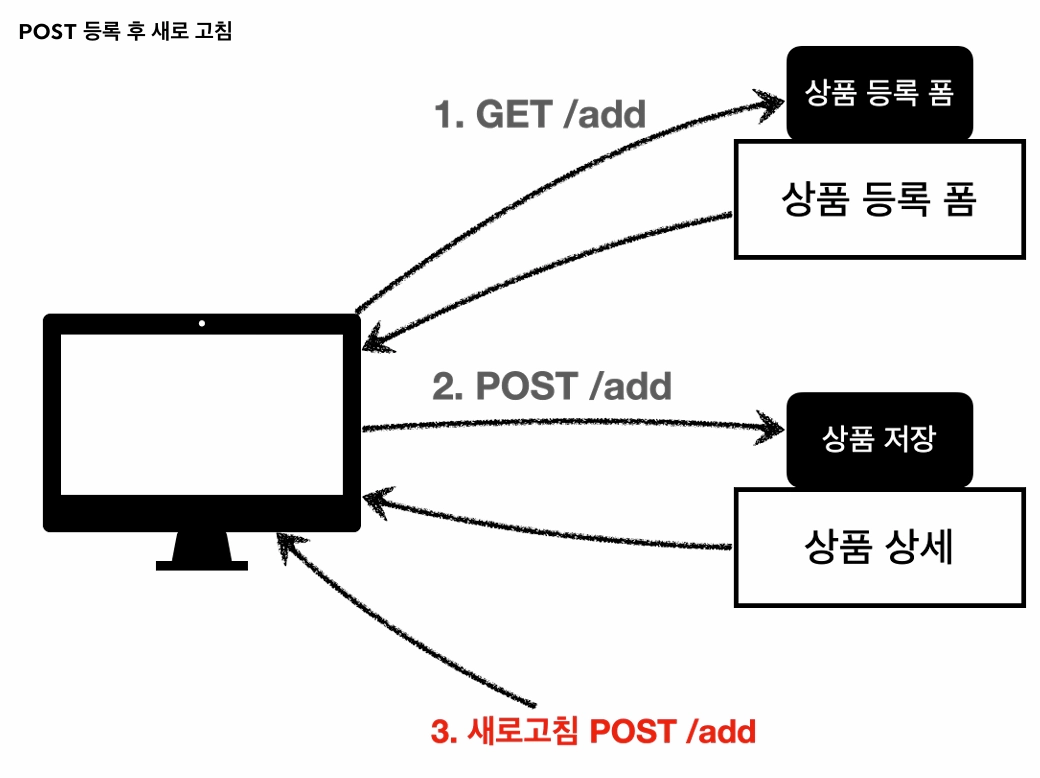
해결 방안
상품 저장 후 상세 화면으로 리다이렉트(Redirect)를 호출한다. 그러면 마지막 명령이 GET /items/{id}로 바뀌어 새로고침 시 조회가 반복될 뿐, 중복 저장은 발생하지 않는다.
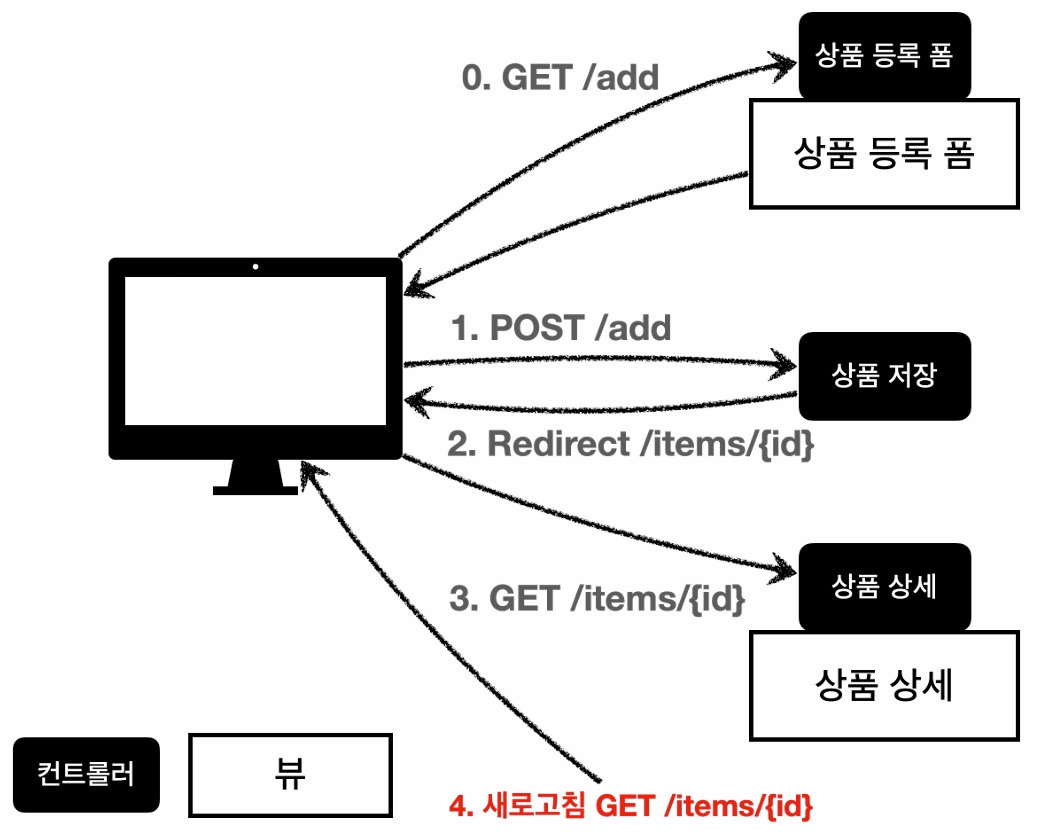
addItemV5 - PRG 적용
@PostMapping("/add")
public String addItemV5(Item item) {
    itemRepository.save(item);
    return "redirect:/basic/items/" + item.getId();
}
- 주의: + item.getId()처럼 URL에 변수를 더하는 것은 인코딩 문제가 발생할 수 있어 위험하다.
11. RedirectAttributes
저장 완료 시 상세 화면에 "저장되었습니다" 메시지를 띄우는 요구사항을 처리한다.
addItemV6 - RedirectAttributes 적용
@PostMapping("/add")
public String addItemV6(Item item, RedirectAttributes redirectAttributes) {
    Item savedItem = itemRepository.save(item);
    redirectAttributes.addAttribute("itemId", savedItem.getId());
    redirectAttributes.addAttribute("status", true);
    return "redirect:/basic/items/{itemId}";
}
- RedirectAttributes는 URL 인코딩을 지원하고, {itemId}처럼 경로 변수를 바인딩하며 나머지는 쿼리 파라미터(?status=true)로 처리한다.
뷰 템플릿 메시지 추가 (/resources/templates/basic/item.html)
<h2 th:if="${param.status}" th:text="'저장 완료!'"></h2>
- th:if: 조건이 참일 때만 실행한다.
- ${param.status}: 타임리프에서 쿼리 파라미터를 편리하게 조회하는 기능이다.
'INFLEARN' 카테고리의 다른 글
| [스프링 MVC 2편 - 백엔드 웹 개발 핵심 기술] 2. 타임리프 - 스프링 통합과 폼 (0) | 2026.05.26 |
|---|---|
| [스프링 MVC 2편 - 백엔드 웹 개발 핵심 기술] 1. 타임리프(Thymeleaf) 기본 기능 (0) | 2026.05.02 |
| [스프링 MVC 1편 - 백엔드 웹 개발 핵심 기술] 7. 스프링 MVC - 기본 기능 (0) | 2026.04.19 |
| [스프링 MVC 1편 - 백엔드 웹 개발 핵심 기술] 6. 스프링 MVC - 구조 이해 (0) | 2026.04.14 |
| [스프링 MVC 1편 - 백엔드 웹 개발 핵심 기술] 5. MVC 프레임워크 만들기 (0) | 2026.04.09 |