오토인코더 개요
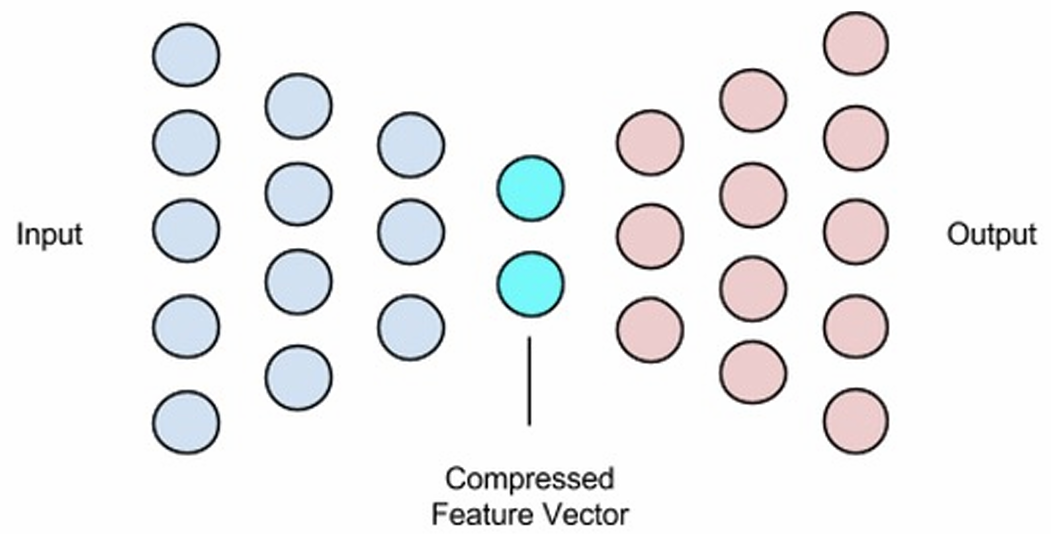
- 정의: 오토인코더(Autoencoder)는 데이터 인코딩 방법을 학습하는 효과적인 딥러닝 모델.
- 특징: 입력 데이터만 가지고 학습을 진행.
- 학습 방식: 입력 데이터 자체가 정답 데이터(Label)가 됨.
- 프로세스: 데이터를 효율적으로 압축했다가 다시 원본 데이터로 복원하는 과정을 학습하는 비지도 학습.
- 목표: 주어진 입력과 동일한 출력을 만들도록 학습.
- 구조: 인코더(Encoder)와 디코더(Decoder)로 구성.
- Encoder: 입력 데이터를 특징 공간(feature space)으로 변환 (압축).
- Decoder: 특징 공간의 데이터를 원래 데이터로 복원.
- 장점: 입력 데이터만으로 해당 데이터의 중요한 특징(압축된 데이터)을 추출 가능.
오토인코더(AE) vs 차원 축소
- 차원 축소 (Dimension Reduction): 고차원 데이터의 계산량, 의미 있는 정보 추출의 한계로 인해 저차원 데이터로 변환하는 기법
- 전통적 기법: PCA(Principal Component Analysis), SVD(Singular Vector Decomposition) 등은 의미 있는 정보를 남기기 위해 사용되는 선형적 방법
- PCA: 데이터 그래프에서 데이터 흐름을 가장 잘 표현하는 축을 뽑아 차원 축소를 진행
- AE와의 차이: 오토인코더는 비선형적 방법으로 차원을 축소
오토인코더 구조 및 학습
- 손실 함수(Loss Function): 네트워크 출력값( decoder(encoder(x)) )이 입력값( x )과 얼마나 차이 나는지 측정.
- 손실 계산: 입력 레이어(Input)와 복원된 데이터(Output) 사이의 차이를 가지고 Loss를 계산
- 손실 함수 수식: $\mathfrak{I}_{AE}=(\sum_{x\in D_{n}}L(x,decoder(encoder(x))$
- Keras 학습: Model.fit(X, X) 형태로 입력(X)과 타깃(X)을 동일하게 설정하여 학습
- "Bottleneck": 압축된 표현(Code, h)이 있는 가장 좁은 중앙의 은닉층을 의미.
실습 1: 기본 오토인코더
- MNIST 데이터를 784차원으로 입력받아 32차원으로 압축 후 다시 784차원으로 복원
- 활성화 함수: Hidden Layer는 'relu', Output Layer는 'sigmoid' 사용
- 참고: 압축 차원을 32보다 작게 하면, 더 적은 수의 특징으로 줄여야 하므로 복원 결과가 뿌옇게 변함.
- 모델 구현 코드
inp = Input(shape=(784,)) #모델 작성 z = Dense(32, activation='relu')(inp) #입력 데이터 압축 output = Dense(784, activation='sigmoid')(z) # 입력 데이터 autoencoder = Model(inputs=inp, outputs=output) - 데이터 준비 및 학습 코드
# 데이터 로딩과 전처리 from tensorflow.keras.datasets import mnist import numpy as np (x_train, ), (x_test, _) = mnist.load_data() x_train = x_train.astype('float32') / 255. x_test = x_test.astype('float32') / 255. x_train = x_train.reshape((len(x_train), np.prod(x_train.shape[1:]))) x_test = x_test.reshape((len(x_test), np.prod(x_test.shape[1:]))) print(x_train.shape) print(x_test.shape) from tensorflow.keras.layers import Input, Dense from tensorflow.keras.models import Model from tensorflow.keras import Sequential #여기에 모델 코드를 작성하세요 # pixel 단위이기 때문에 binary crossentropy 사용 autoencoder.compile(optimizer='adadelta', loss='binary_crossentropy', metrics=['accuracy']) autoencoder.fit(x_train, x_train, epochs=50, batch_size=256, shuffle=True, validation_data=(x_test, x_test)) - 결과 시각화 코드
# use Matplotlib (don't ask)
import matplotlib.pyplot as plt
#총 10장의 사진을 보여줌
n = 10
#입력 10장, 복원된 출력 10장
plt.figure(figsize=(20, 4)) # figsize는 가로 세로 비율 (10, 2) * 2 inch
for i in range(n):
    # display original
    ax = plt.subplot(2, n, i + 1)
    plt.imshow(x_test[i].reshape(28, 28)) # 원래 이미지 출력
    plt.gray()
    ax.get_xaxis().set_visible(False)
    ax.get_yaxis().set_visible(False)

    # display reconstruction
    ax = plt.subplot(2, n, i + 1 + n)
    plt.imshow(decoded_imgs[i].reshape(28, 28)) # 복원된 이미지 출력
    plt.gray()
    ax.get_xaxis().set_visible(False)
    ax.get_yaxis().set_visible(False)
plt.show()
실습 2: Deep Autoencoder
- MNIST 데이터를 사용하여 Autoencoder를 깊게(Deep) 구성
- (784 -> 128 -> 64 -> 32 -> 64 -> 128 -> 784) 구조
- 모델 구현 코드
inp = Input(shape=(784,))
encoded = Dense(128, activation='relu')(inp)
encoded = Dense(64, activation='relu')(encoded)
encoded = Dense(32, activation='relu')(encoded)
decoded = Dense(64, activation='relu')(encoded)
decoded = Dense(128, activation='relu')(decoded)
decoded = Dense(784, activation='sigmoid')(decoded)
autoencoder = Model(inputs=inp, outputs=decoded)
실습 3: Conv Autoencoder
- 이미지 데이터(MNIST)에 적합한 CNN(Conv2D) Layer를 이용하여 학습
- Decoder는 Encoder와 대칭을 이루도록 구현 (Conv2D <-> Conv2D, MaxPooling2D <-> UpSampling2D)
- 모델 구현 코드
# Encoder
inp = Input(shape=(28, 28, 1))
encoded = Conv2D(16, (3, 3), activation='relu', padding='same')(inp)
encoded = MaxPooling2D((2, 2), padding='same')(encoded)
encoded = Conv2D(16, (3, 3), activation='relu', padding='same')(encoded)
encoded = MaxPooling2D((2, 2), padding='same')(encoded)
encoded = Conv2D(8, (3, 3), activation='relu', padding='same')(encoded)
encoded = Conv2D(8, (3, 3), activation='relu', padding='same')(encoded)

# Decoder
decoded = Conv2D(8, (3, 3), activation='relu', padding='same')(encoded)
decoded = Conv2D(8, (3, 3), activation='relu', padding='same')(decoded)
decoded = UpSampling2D((2, 2))(decoded)
decoded = Conv2D(16, (3, 3), activation='relu', padding='same')(decoded)
decoded = Conv2D(16, (3, 3), activation='relu', padding='same')(decoded)
decoded = UpSampling2D((2, 2))(decoded)
decoded = Conv2D(1, (3, 3), activation='sigmoid', padding='same')(decoded)
# (28, 28, 16)-> (28, 28, 1) 최종 이미지 채널(1)로 맞춤

autoencoder = Model(inputs=inp, outputs=decoded)
오토인코더 응용
- 주요 응용 분야
- Anomaly Detection (이상치 탐지)
- 데이터 Denoising (노이즈 제거)
- 이미지 컬러링 (흑백 -> 컬러)
- 이미지 생성 (유사 이미지)
- Super Resolution (저해상도 -> 고해상도)
1. Anomaly Detection (이상치 탐지)
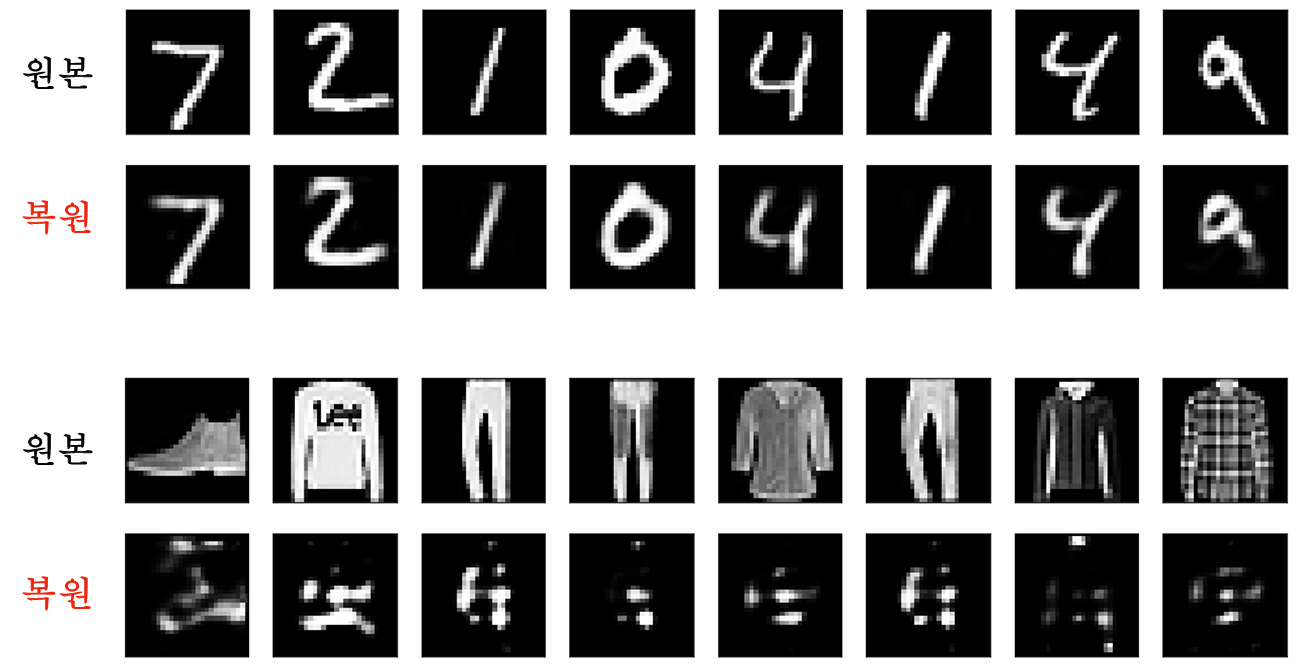
- 원리: AE는 학습한 데이터(ex: MNIST 숫자)는 잘 복원하지만, 학습하지 않은 데이터(ex: Fashion MNIST 의류)는 복원을 잘 못함
- 활용: 복원 오류(Reconstruction Error)를 이용해 이상 징후를 탐지36. 원본과 복원본의 차이가 특정 기준 이상이면 이상치로 판단
- Fashion MNIST 테스트 코드
from keras.datasets import fashion_mnist
(x_train_fashion, y_train_fashion), (x_test_fashion, y_test_fashion) = fashion_mnist.load_data()
x_train_fashion = x_train_fashion.astype('float32') / 255.
x_test_fashion = x_test_fashion.astype('float32') / 255.
x_train_fashion = x_train_fashion.reshape((len(x_train_fashion), np.prod(x_train_fashion.shape[1:])))
x_test_fashion = x_test_fashion.reshape((len(x_test_fashion), np.prod(x_test_fashion.shape[1:])))
print(x_train_fashion.shape)
print(x_test_fashion.shape)
decoded_imgs_fashion = autoencoder.predict(x_test_fashion)
2. Denoising Autoencoder (DAE)

- 정의: 입력 데이터에 노이즈가 있는 경우, 이를 제거하여 원본을 복원
- 학습 과정:
- 주어진 원본 데이터(x)에 임의로 노이즈를 추가하여 입력 데이터(x')를 생성
- 모델이 x'을 입력받아 원본 x를 복원하도록 학습
- 노이즈 없는 데이터에서 노이즈 데이터를 만들어 (노이즈 데이터, 원본 데이터) 쌍으로 학습
- 입/출력: 입력은 노이즈 포함 데이터, 출력(정답)은 노이즈 없는 원본 데이터.
- 학습 유형: 비지도 학습의 큰 틀을 따르나, 데이터 쌍을 스스로 생성하므로 **자기 지도 학습(Self-Supervised Learning)**에 속함
- DAE 손실 함수: $\mathfrak{I}_{DAE}=(\sum_{x\in D_{n}}L(x,g(f(x^{\prime})))$.
- DAE 실습 (노이즈 추가) 코드
# 입력에 노이즈를 추가
noise_factor = 0.5
x_train_noisy = x_train + noise_factor * np.random.normal(loc=0.0, scale=1.0, size=x_train.shape)
x_test_noisy = x_test + noise_factor * np.random.normal(loc=0.0, scale=1.0, size=x_test.shape)
x_train_noisy = np.clip(x_train_noisy, 0., 1.)
x_test_noisy = np.clip(x_test_noisy, 0., 1.)

import matplotlib.pyplot as plt
n = 10
#입력 10장, 복원된 출력 10장
plt.figure(figsize=(20, 2))
for i in range(n):
    ax = plt.subplot(1, n, i + 1)
    plt.imshow(x_test_noisy[i].reshape(28, 28))
    plt.gray()
    ax.get_xaxis().set_visible(False)
    ax.get_yaxis().set_visible(False)
plt.show()
3. Latent Space (잠재 공간)
- 정의: 데이터의 숨어있는 저차원 특징 공간
- 매핑: 고차원 데이터(ex: 120x120 이미지)를 저차원의 점(ex: 2차원 <Zi, Zo>)으로 매핑
- 활용 (이미지 생성): Latent space 크기와 같은 임의의 벡터를 Decoder에 입력하여 새로운 이미지를 생성 가능
- 특징 벡터 연산: Latent space 내에서 벡터 연산이 가능 (ex: 웃는 여자 - 무표정 여자 + 무표정 남자 = 웃는 남자)
'AI(ML & DL)' 카테고리의 다른 글
| [딥러닝]Sequence to Sequence (1) | 2025.11.18 |
|---|---|
| [딥러닝] Gradient 및 자동 미분(Autogradient) (0) | 2025.11.11 |
| [딥러닝] 검증된 AI 모델 활용(Keras Applications) (0) | 2025.10.28 |
| [딥러닝] 모델 다루기 (Sequential & Functional + Inception Module 실습) (0) | 2025.10.23 |
| [딥러닝] CNN의 역사, Dropout과 Batch Normalization (0) | 2025.10.21 |